
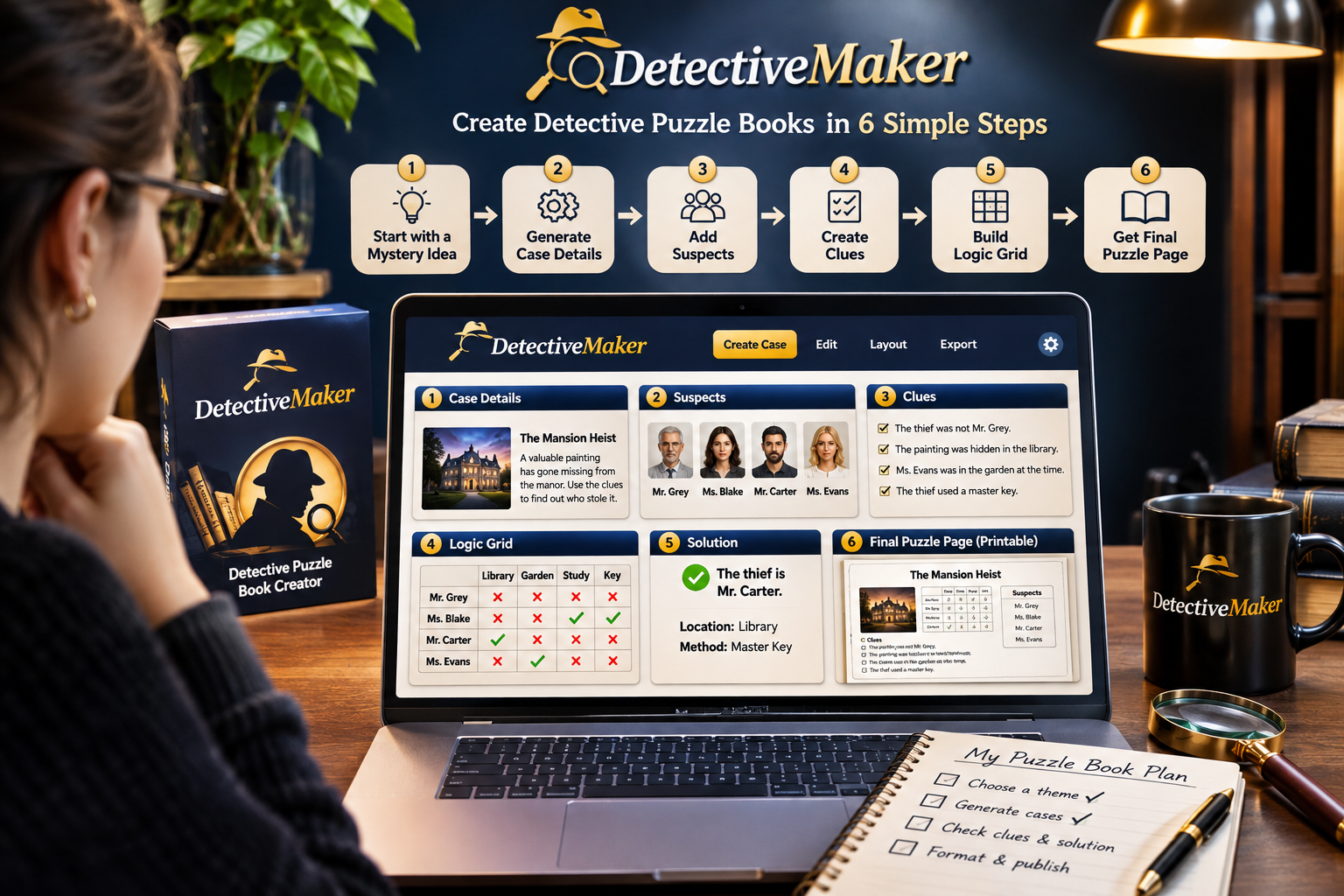
To use Detective Maker, start by choosing how you want to connect its AI features, generate a detective case, review the story and clues, organize the deduction grid, and customize the puzzle pages in the visual editor. You do not need to build every part of a mystery from a blank page: the software can generate the case story, suspects, weapons, locations, clues, evidence and solution for you to edit. You can explore Detective Maker and its available access options if you want to follow along with the walkthrough.
What Should You Prepare Before Using Detective Maker?
Before creating your first puzzle, decide what kind of detective activity you want to make. Think about the mystery theme, the intended reader and how challenging the deduction should be. You do not need to write a complete story in advance, but having a basic idea can help guide the content you generate.
You should also consider which AI connection you plan to use. Detective Maker provides three approaches:
- Detective JSON Maker MCP plugin: The plugin is included with the purchase, along with setup instructions.
- Your own API key: You can connect an API key from a supported AI provider. Provider usage charges may apply separately.
- Built-in BrosAI: This option provides access to supported AI models through the BrosAI system. The product information includes 500 starting credits, with an optional 7,000-credit plan for $15 per month across The Bros Studio tools.
Choose the option that fits your existing setup and budget. If you are new to AI integrations, read the supplied setup instructions before starting.
How to Create Your First Detective Puzzle
Step 1: Open the Tool and Set Up Your AI Option
Begin by opening Detective Maker and following the setup process for your selected AI connection. If you use the included MCP plugin, refer to its instructions. If you connect your own API key, make sure it is entered correctly and that you understand any separate provider charges.
Once your AI option is ready, you can move on to creating the case content.
Step 2: Generate a Detective Case Story
Use the AI creation features to develop the central mystery. Detective Maker can generate a case story and the supporting components needed to turn it into a deduction puzzle.
Depending on your concept, the generated material can include:
- A detective case story introducing the mystery.
- Suspects connected to the case.
- Weapons and locations relevant to the investigation.
- Clues and evidence for readers to examine.
- A deduction grid and a solution.
Review the generated story before moving forward. Check that the names, locations and events are consistent, and that the mystery is understandable. AI-generated content is a starting point, not a substitute for editorial review.
Step 3: Check the Clues, Evidence and Logic Grid
The deduction grid is an important part of the finished puzzle. It gives readers a structured way to compare suspects, locations, weapons and other details while eliminating possibilities that do not match the clues.
Read every clue and test whether it supports the intended solution. Ask yourself whether a reader could reasonably reach the correct answer using the information provided. Look for contradictions, missing information or clues that make the answer too obvious.
Practical tip: Try solving the puzzle yourself without looking at the solution. If the evidence does not lead clearly to the intended answer, revise the clues or supporting details before publishing.
Step 4: Edit the Puzzle in the Visual Editor
After reviewing the case content, use Detective Maker’s visual editor to refine the presentation. The editor supports changes to generated content and lets you work with page elements using drag-and-drop blocks.
You can also adjust book size and margins, manage page numbering, control solution display and add pages. The software supports unlimited puzzle pages, which gives you flexibility when organizing a longer collection.
Focus on readability. Make sure the story, clues and grid are arranged in an order that makes sense, and leave enough space for readers to work through the puzzle.
Step 5: Review the Finished Pages
Before treating your project as complete, review the full page sequence. Check the spelling, formatting, page numbers, grid presentation and solution placement. Confirm that every puzzle has the information readers need and that its answer matches the clues.
If you are creating several puzzles, consistent formatting can make the collection feel more organized. Detective Maker’s additional design and project controls may help with this process, depending on the version you use.
Can Beginners Use Detective Maker?
Yes. Detective Maker is designed to assist with generating and arranging detective puzzles, so beginners can use its AI features as a starting point rather than creating every story element manually. The visual editor also provides a way to refine the generated material and page layouts.
However, beginners should allow time to learn the AI setup and editing workflow. The quality of the final puzzle still depends on checking the logic, improving the writing and reviewing the page design. For a closer look at the available features and package differences, see the complete Detective Maker review and product breakdown.
Common Mistakes to Avoid When Creating Detective Puzzles
- Accepting the first AI draft: Review and refine stories, clues and solutions instead of assuming every generated detail is correct.
- Using contradictory clues: Make sure the evidence supports the intended answer.
- Ignoring the reader’s experience: Keep instructions clear and make the deduction grid easy to understand.
- Skipping the final layout check: Review margins, page numbers, solution placement and readability.
- Publishing without testing: Work through each puzzle before sharing or selling the finished book.
Final Thoughts: Is Detective Maker Suitable for Beginners?
Detective Maker gives beginners a practical starting point for creating detective deduction puzzles. Its AI-assisted case stories, suspects, clues, evidence, logic grids, solutions and visual editing tools bring several parts of the creation process together. The key is to use AI for assistance while keeping control of the final content and presentation.
Start with one simple case, test its clues and solution, refine the page layout, and only then move on to a larger collection. For more information about the product, its features, pricing and upgrade options, read the full Detective Maker review and buying guide.