
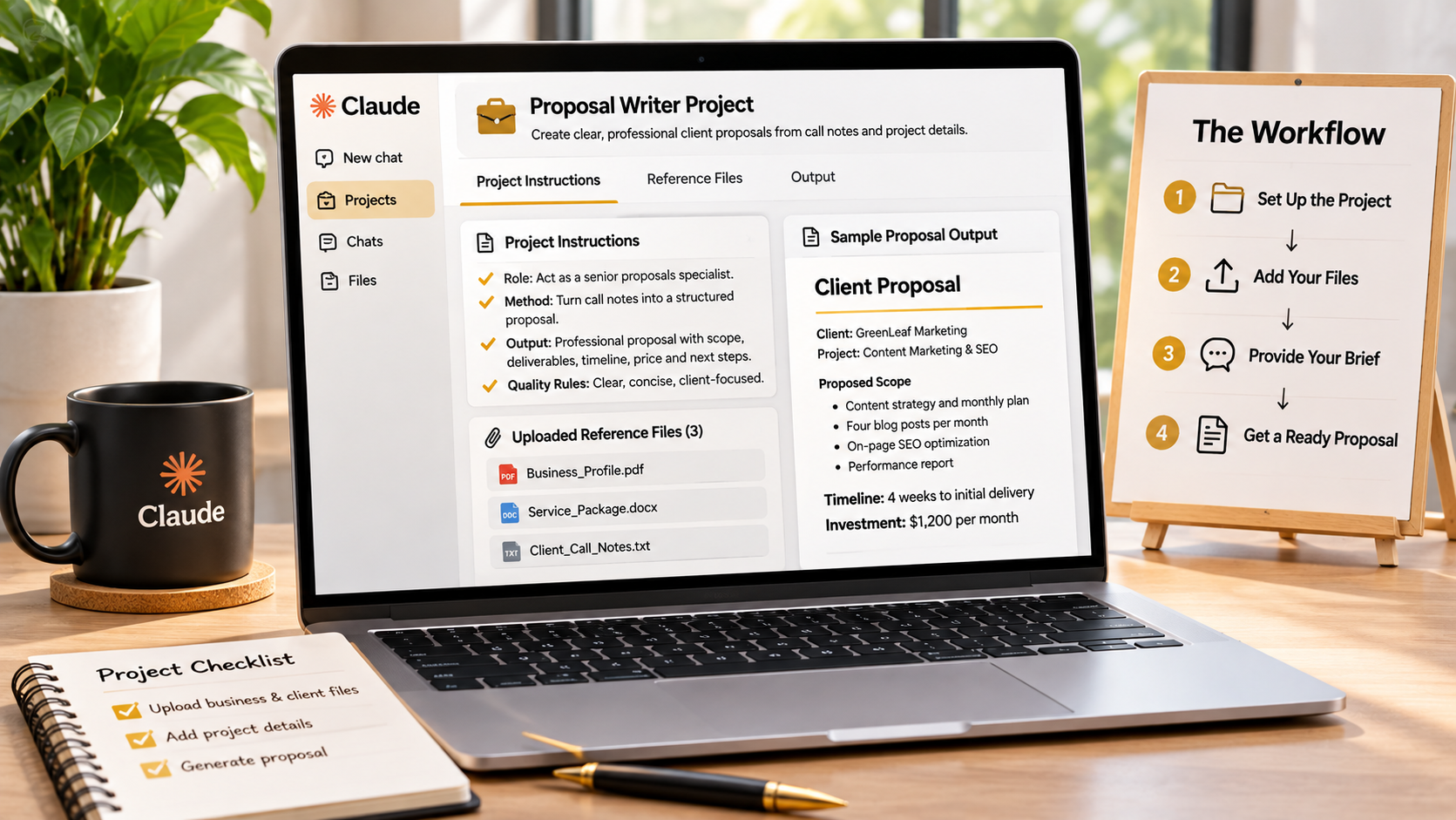
To set up and use your first Claude Business Brain Project, choose one business task, open its dedicated Project guide, prepare the recommended business or client information, follow the copy-and-paste setup instructions, and send the suggested first message. You do not need to configure all 47 Projects before getting started. Begin with one useful workflow, such as Proposal Writer, Lead List Builder, or Invoice Chaser, and use it to complete a real task. Explore Claude Business Brain and get the complete Project collection here.
What Is a Claude Business Brain Project?
A Claude Business Brain Project is a prepared specialist setup for Claude’s Projects feature. Rather than using a generic prompt in a new chat every time, each Project gives Claude a defined role, a step-by-step method, an expected output format, quality rules, and guidance about which files to add.
The purpose is to make a particular business workflow more repeatable. Once configured, chats inside that Project can follow the same specialist instructions, helping you avoid repeatedly explaining the task and the context from scratch.
Step 1: Choose the First Project You Actually Need
Start by identifying a task you perform regularly or one that currently takes too much time. Do not begin by trying to set up all 47 Projects. Choose the workflow that solves an immediate problem.
- Lead List Builder: Choose this if you need a more organised way to find and evaluate potential clients.
- Proposal Writer: Choose this if you regularly turn sales-call notes into client proposals.
- Social Content Month: Choose this if you plan and create monthly social media content for clients.
- Invoice Chaser: Choose this if following up on overdue payments is a recurring task.
For a first-time user, Proposal Writer is a practical option if you have notes from a recent client conversation. You can use an actual business task to understand how the instructions and output work.
Step 2: Prepare Your Business Profile and Client Card
Before running a Project, prepare the information Claude needs to produce relevant work. Claude Business Brain includes a Business Profile and a Client Card for this purpose.
The Business Profile provides reusable context about your own business. The Client Card helps adapt the work to an individual client’s voice, scope, and deadlines. The product presents these as information you fill in once and reuse across Projects.
For example, if you are preparing a proposal, useful context may include your services, packages, prices, preferred working style, and relevant business details. For client work, add the information needed to understand that client’s requirements and preferences.
Use accurate information and check that any prices, deadlines, or commitments are current. The quality of the result depends partly on the quality of the context you provide.
Step 3: Follow the Project’s Setup Instructions
Each of the 47 Projects has its own dedicated guide. The guide explains when to use it, which files to add, how to configure it, what first message to send, and what a sample output should look like.
Follow the instructions for your selected Project rather than assuming every Project needs identical information. The recommended files and setup details can differ according to the task.
- Open the guide for your selected Project.
- Read the section explaining when and why to use it.
- Review the exact files-to-add list and prepare the relevant materials.
- Follow the supplied copy-and-paste setup instructions in Claude’s Projects feature.
- Use the Project’s suggested first message to begin the workflow.
This gives Claude a defined role and working method before you ask it to complete the task.
Step 4: Run Your First Real Task
Now give the Project the information it needs. If you selected Proposal Writer, for example, paste your notes from the sales conversation and ask it to write the proposal.
The intended workflow is designed to organise the client’s stated requirements separately from your assumptions. It can structure deliverables, exclusions, timeline, price, and next steps, while identifying assumptions that you should check before sending the proposal.
Review the result carefully. Confirm that the proposal reflects what the client actually requested, that the price and timeline are correct, and that no unapproved promises have been introduced. Claude can help prepare the document, but you remain responsible for checking and approving the final version.
Step 5: Improve the Result and Reuse the Workflow
Do not treat the first response as automatically final. Use the Project’s follow-up guidance to refine the output, correct missing details, and make the result more useful. The supplied example output gives you a reference for the kind of structure the Project is designed to produce.
Once you are comfortable with the process, reuse the Project for similar tasks with the appropriate business or client information. This is where a prepared specialist workspace can be more convenient than repeatedly rebuilding instructions in ordinary chats.
What Else Helps You Get Started?
The package also includes 12 Client Recipes, 33 Power-Ups, and a seven-day Quick Start designed around using one Project per day. The materials are supplied as a 113-page PDF, editable Word document, and copy-and-paste TXT files. The included 24-lesson Claude Business Bootcamp provides additional lessons and exercises covering topics such as instructions, files, Projects, skills, connectors, artifacts, agents, confidentiality, and a 30-day plan.
You can explore the complete package, its six-stage Client Loop, included resources, and pricing in the full Claude Business Brain review.
Can Beginners Set Up a Claude Business Brain Project?
Yes. The Projects are supplied with setup instructions, recommended files, a first message, a sample output, follow-up guidance, and a practical tip. This gives beginners a structured starting point instead of requiring them to design every workflow themselves. You will still need access to a compatible AI assistant and should follow the instructions for the service and plan you use.
Final Thoughts: Start with One Project
The easiest way to learn Claude Business Brain is to start small. Choose one task you already understand, prepare your Business Profile or Client Card information, follow the relevant Project guide, and test the workflow using a real example. Check the output, refine it, and reuse the setup when the same type of work comes around again.
You do not need to master all 47 Projects on day one. Start with one specialist workflow, understand how it works, and expand into other stages of the Client Loop as your business needs them. For the complete feature, pricing, and package breakdown, visit the Claude Business Brain review here.