
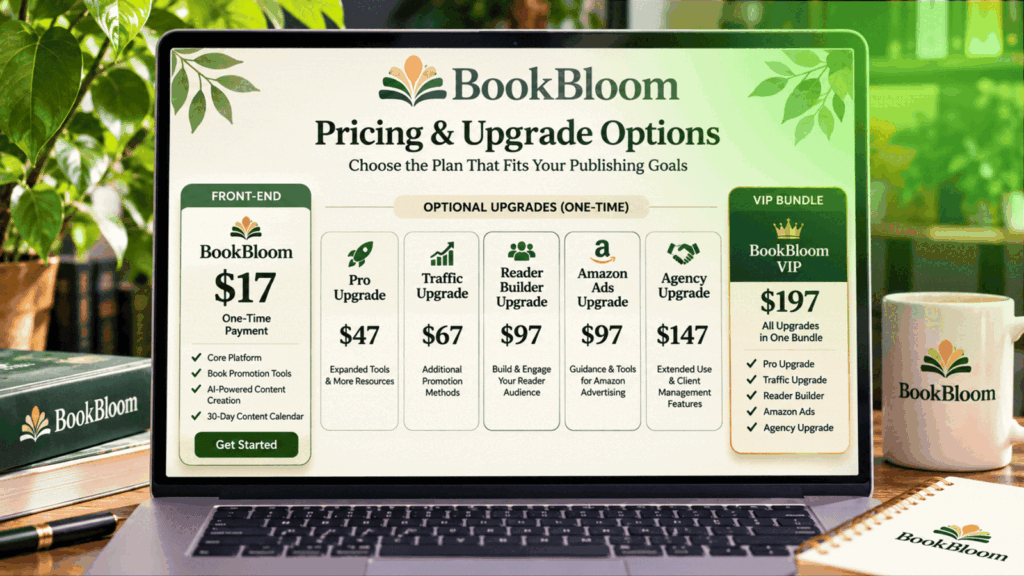
BookBloom’s reported launch pricing starts at $17 for the front-end software, with five optional upgrades priced between $37 and $97, plus a $197 VIP Bundle covering all five upgrades. The front-end offer provides the core book-promotion workflow, while the OTOs add capabilities for advanced campaigns, traffic planning, reader building, Amazon advertising and agency services. Check the BookBloom offer and current checkout pricing here.
BookBloom Pricing at a Glance
BookBloom is sold through WarriorPlus using a front-end offer followed by optional one-time offers, commonly called OTOs. You can start with the main product and decide whether any additional features are worth paying for.
| Offer | Reported Price |
|---|---|
| BookBloom Front End | $17 |
| OTO 1: BookBloom Pro | $37 |
| OTO 2: BookBloom Traffic | $47 |
| OTO 3: BookBloom Reader Builder | $37 |
| OTO 4: BookBloom Amazon Ads | $47 |
| OTO 5: BookBloom Agency | $97 |
| VIP Bundle: All Five Upgrades | $197 |
These are reported launch prices, not a guarantee of what every buyer will see. Check the actual WarriorPlus checkout for current availability, pricing and terms before completing an order.
What Do You Get With the $17 Front-End Offer?
BookBloom Front End
$17 one-time
The front-end product provides the core tools for preparing a book-promotion campaign. It is designed for authors who want to create and organise Pinterest-focused promotional content for their published books.
The core workflow includes features such as:
- Book content analysis: provide an Amazon book URL and/or suitable book material to help develop promotional ideas.
- AI promotion strategy: generate different content angles for presenting your book to potential readers.
- Artwork Studio: prepare Pinterest promotional graphics using your book cover and selected visual styles.
- AI copywriting: create hooks, headlines, captions, calls to action and keyword phrases.
- 30-day calendar: organise promotional content into a dated campaign schedule.
- CSV export: export campaign content for use in your Pinterest publishing workflow.
- Book landing page: create a page with book information, store links and an email opt-in.
- Promotion resources: access tools such as the Promotion Finder, channel catalog and KDP research features.
- Basic tracking: review available page views and clicks.
The front end is the logical place to start if your main goal is to prepare a structured Pinterest campaign for one or more published books. You do not need to purchase every upgrade to use the core product.
BookBloom OTOs Explained: What Does Each Upgrade Add?
Each OTO is an optional purchase designed for a different type of user. Here is what the five upgrades are intended to provide.
OTO 1: BookBloom Pro
$37 one-time
BookBloom Pro is aimed at authors who want more advanced creative and campaign workflows.
- Expanded active-book capacity and batch workflows.
- Premium editable layouts and brand presets.
- Next-month campaign capabilities.
- Video Studio with storyboard creation.
- Publishing options for your own Netlify account.
Who may need it? Authors managing multiple titles or wanting additional creative tools and more efficient campaign preparation.
OTO 2: BookBloom Traffic
$47 one-time
This upgrade focuses on finding additional promotional opportunities beyond the basic Pinterest campaign.
- Free-promotion channel planning.
- A guided seven-day traffic action plan.
- Promotional materials for different channels.
- Ad graphics, carousels and outreach content.
- Additional promotional video and campaign resources.
Who may need it? Authors who want to explore more ways to promote their books outside their primary Pinterest workflow.
OTO 3: BookBloom Reader Builder
$37 one-time
Reader Builder is focused on turning interested visitors into email subscribers and developing an ongoing relationship with potential readers.
- Reader bonus and companion-content creation.
- Email opt-in pages.
- Bonus delivery workflows.
- Email follow-up sequence tools.
- Subscriber export and email integration features.
Who may need it? Authors who want to build an email list and create a way to reconnect with readers beyond a single book visit.
OTO 4: BookBloom Amazon Ads
$47 one-time
This upgrade is designed to help authors prepare more structured Amazon advertising campaigns.
- Campaign structure preparation.
- Keyword and product-targeting suggestions.
- Suggested starting bids and negative keywords.
- Break-even cost-per-click calculations based on your book royalty information.
- Bulk campaign file preparation for upload.
Who may need it? Authors who intend to explore Amazon Ads and want help preparing campaign information. Advertising spend is separate, and campaigns can lose money.
OTO 5: BookBloom Agency
$97 one-time
Agency is intended for people who want to offer book promotion as a service to authors or publishers.
- Client workspaces and onboarding tools.
- Approval links and client communication workflows.
- Proposals and service deliverables.
- Client reporting resources.
- Commercial service-oriented capabilities.
Who may need it? Freelancers, consultants and agencies planning to provide book marketing services to paying clients. It is likely unnecessary for an author promoting only their own books.
What Is Included in the $197 VIP Bundle?
BookBloom VIP Bundle
$197 one-time
The VIP Bundle is presented as a combined purchase of all five optional upgrades:
- BookBloom Pro
- BookBloom Traffic
- BookBloom Reader Builder
- BookBloom Amazon Ads
- BookBloom Agency
At the reported individual prices, purchasing all five upgrades separately would cost $265. The $197 bundle is therefore $68 less than buying those upgrades individually.
| Purchase Route | Reported Total |
|---|---|
| Five upgrades purchased individually | $265 |
| VIP Bundle covering all five upgrades | $197 |
| Front end plus VIP Bundle | $214 |
| Front end plus all five individual upgrades | $282 |
Do You Need to Buy Every BookBloom Upgrade?
No. The best approach is to choose upgrades based on the work you actually plan to do.
- New or occasional self-published author: Start with the front end and see whether the core campaign tools meet your needs.
- Author managing several books: Consider Pro if its additional capacity and batch workflows would be useful.
- Author seeking more promotional channels: Traffic may be relevant if you want help planning activity beyond Pinterest.
- Author building an email audience: Reader Builder may be useful if you intend to create bonuses and follow-up emails.
- Author planning paid advertising: Consider Amazon Ads only if you have a budget and understand the risks of paid campaigns.
- Freelancer or service provider: Agency is the upgrade most directly aimed at client work.
There is no need to buy an upgrade simply because it appears during checkout. Start with the features you need and evaluate additional purchases separately.
Are There Any Additional Costs?
One important detail is that BookBloom uses your own AI provider API key for AI generation. Any usage charges from that provider are separate from the software purchase.
You should also account for any costs associated with services you choose to use outside BookBloom, such as paid advertising, email marketing platforms or optional hosting arrangements. A Pinterest business account is needed for the Pinterest workflow.
Also remember that the platform helps prepare promotional assets and organise campaigns. It does not guarantee traffic, book sales, rankings or royalties, and you remain responsible for reviewing and publishing your content.
Final Verdict: Which BookBloom Pricing Option Makes Sense?
For most authors who are evaluating BookBloom for the first time, the front-end offer is the sensible starting point. It provides the core book-promotion workflow without requiring an immediate commitment to every additional feature.
The upgrades become more relevant when you have a specific need: Pro for expanded creative workflows, Traffic for additional promotion planning, Reader Builder for email-list development, Amazon Ads for paid campaign preparation, and Agency for client services.
The VIP Bundle may offer a lower combined price if you genuinely intend to use all five upgrades. But buying everything is not automatically the best value if several features will remain unused.
For a closer look at the platform’s workflow, features, strengths and limitations, read the complete BookBloom Review 2026.