
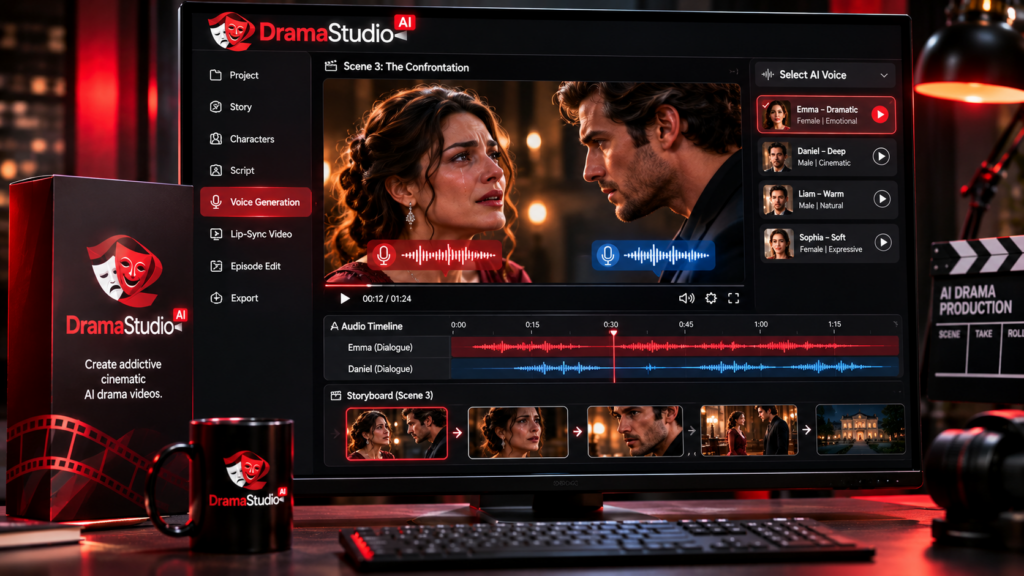
DramaStudioAI makes AI drama characters talk naturally by combining AI-generated voices, emotion-aware dialogue delivery, and lip-sync technology that matches character speech with their on-screen mouth movements. The platform is designed to turn written scripts into talking video scenes, helping creators produce short dramas without recording every line themselves. If you want to create AI-powered episodes with voices and synchronized dialogue, you can explore DramaStudioAI here and see how its voice and video production features work together.
What Are DramaStudioAI AI Voices and Lip-Sync?
AI voices are digitally generated speech created from written dialogue. Instead of hiring voice actors or recording every character manually, creators can use AI voice technology to turn scripts into spoken lines.
Lip-sync is the process of matching a character’s mouth movements with the words being spoken. When voice generation and lip-sync work together, an AI-generated character can appear to speak the dialogue rather than simply displaying a static image or unrelated animation.
DramaStudioAI brings these capabilities into its drama production workflow. It can generate character dialogue with emotional delivery, select matching voices based on character details, and create synchronized talking shots. This is particularly useful for creators producing serialized stories for short-form video platforms.
How DramaStudioAI Generates Character Voices
DramaStudioAI connects voice generation to the characters and scripts created during the storytelling process. When characters are developed, the platform can automatically select a matching voice based on details such as age, gender, and personality.
This helps make the dialogue feel more connected to the character rather than giving every person in the story the same generic voice. A confident business executive, for example, may need a different vocal style from a nervous newcomer or an emotionally distressed family member.
The platform also considers emotional delivery when generating spoken lines. This matters because drama depends on more than simply reading words aloud. Dialogue may need to sound romantic, angry, worried, excited, or serious depending on what is happening in the scene.
How to Create Natural-Sounding AI Drama Characters
Getting convincing results starts with the script. Follow this workflow when creating a drama with DramaStudioAI.
1. Develop Your Story and Characters
Begin with a story idea or choose a ready-made template. DramaStudioAI develops the premise and suggests characters for the story. Review the cast so each character has a clear role and personality. These details help guide the voice selection process.
2. Create Clear, Conversational Dialogue
Write dialogue that sounds like something a real person would say. Short, direct sentences are generally easier to follow in vertical drama videos. DramaStudioAI’s script workflow is designed around concise dialogue lines, helping keep scenes focused and suitable for short episodes.
3. Let the Platform Match Character Voices
As the production moves into the voice stage, DramaStudioAI can automatically pick a voice based on character attributes. Review the result in context. The voice should suit the character’s personality and the emotional purpose of the scene.
4. Generate Lip-Synced Video Shots
Once the dialogue and voices are ready, the platform generates video shots with lip-sync. The technology is designed to align the character’s mouth movements with the spoken dialogue, making the scene feel more like a conversation between on-screen characters.
5. Preview and Refine the Episode
Watch the generated scene before exporting. Check whether the voice suits the character, the dialogue is understandable, and the mouth movements appear synchronized. Also listen for changes in tone that may affect the emotion of the scene.
What Makes Lip-Sync Important for AI Drama Videos?
Without synchronized speech, a character may appear disconnected from the conversation. Viewers can hear dialogue while watching a face that does not seem to be speaking. This can make an otherwise interesting story feel less convincing.
Good lip-sync helps create a stronger connection between the character and the dialogue. It is especially valuable in:
- Romance scenes: Conversations and emotional exchanges feel more engaging when characters appear to speak naturally.
- Arguments and confrontations: Synchronized dialogue supports intense exchanges between characters.
- Family dramas: Emotional conversations become easier to follow when the speaker is visually clear.
- Story-driven social videos: Talking characters help communicate the plot without relying entirely on captions.
- Multi-episode series: Consistent voice choices help audiences recognize recurring characters.
Tips for Better AI Voice and Lip-Sync Results
- Keep dialogue concise: Short lines are easier for viewers to follow in fast-paced scenes.
- Give characters distinct personalities: Different character profiles help support more suitable voice choices.
- Match emotion to the scene: A romantic confession should not sound like an ordinary announcement.
- Avoid overcrowded conversations: Give important lines enough space so viewers can understand who is speaking.
- Preview every talking shot: Check voice quality and mouth synchronization before publishing.
- Use music carefully: Background music should support the mood without overpowering dialogue.
What Voice and Lip-Sync Options Does DramaStudioAI Offer?
DramaStudioAI’s advertised front-end features include five daily lip-sync shots, with one generation job running at a time. Its lip-sync output is offered in 480p or 720p, making it suitable for creators producing short vertical drama episodes. The platform also provides music options, sound effects, captions, and an episode editor where creators can preview the finished audio and video together.
These features are part of a broader workflow that moves from idea and script development through characters, scenes, visuals, voice, and final video. For a deeper look at the complete feature set and how the platform works, read our complete DramaStudioAI review.
Are DramaStudioAI AI Voices and Lip-Sync Worth Using?
For creators who want to produce dialogue-driven AI dramas without manually recording every character, DramaStudioAI offers a convenient combination of AI voice generation and lip-synced video creation. Its automatic voice matching and emotion-aware delivery are designed to make the production process easier, while synchronized talking shots help bring written scripts to life.
AI-generated speech and lip-sync can still require review. Results may vary depending on the scene, dialogue, and generation, so previewing each episode remains important. However, having voice and lip-sync tools within the same drama creation workflow can reduce the number of separate production steps.
Final Thoughts
DramaStudioAI AI voices and lip-sync help creators turn written drama scripts into scenes where characters speak with generated voices and synchronized mouth movements. By combining character-based voice matching, emotional dialogue delivery, and talking video shots, the platform makes it easier to produce short-form AI dramas without traditional voice recording.
If natural-sounding character conversations are important to your next AI video project, explore the platform’s complete capabilities and see whether its workflow matches your needs in our DramaStudioAI review.