
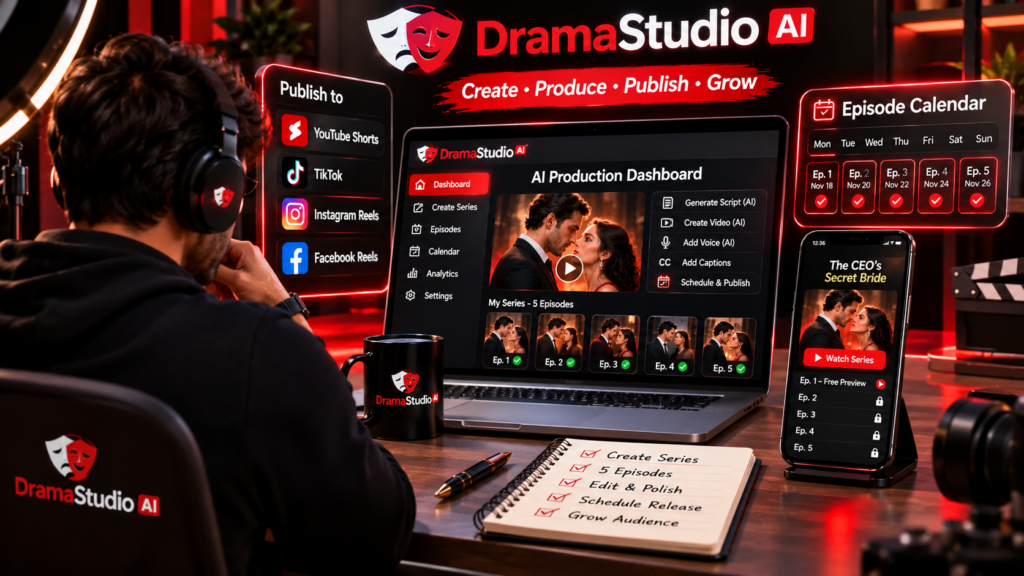
You can start a faceless AI drama channel with DramaStudioAI by using AI to create storylines, characters, scripts, voices, lip-synced scenes, and complete short-form video episodes without appearing on camera yourself. The platform brings these production steps together, allowing creators to build drama series, publish vertical videos, prepare social media content, and even offer premium episodes through a branded streaming channel. If you want to explore a way to launch an AI-powered drama channel without traditional filming, check out DramaStudioAI here.
What Is a Faceless AI Drama Channel?
A faceless AI drama channel publishes story-based video content without requiring the creator to appear on screen. Instead of recording yourself, you use AI-generated characters, dialogue, visuals, and voiceovers to tell stories.
Popular formats include billionaire romance, secret marriage, family conflict, betrayal, revenge, mystery, thriller, and emotional storytelling. These stories can be divided into short episodes, allowing viewers to follow recurring characters and ongoing plots.
The creator works behind the scenes by developing ideas, reviewing AI-generated content, managing the channel, and promoting episodes. This makes the format worth exploring for people interested in digital storytelling but who prefer not to build a personal on-camera presence.
Why Use DramaStudioAI to Start a Faceless Drama Channel?
Producing a drama series traditionally can involve scriptwriters, actors, cameras, voice recording, editing, and post-production. DramaStudioAI is designed to simplify several of these tasks through an integrated AI video creation workflow.
Its tools include:
- AI Story Writer: Develops story concepts, titles, loglines, characters, conflicts, and season storylines.
- Ready-made templates: Provides 105 templates across 22 genres to help creators get started.
- BingeHook Engine: Generates opening hooks and scores them to help creators compare ideas.
- Character creation: Helps establish recurring characters and maintain visual identity using Character DNA Lock.
- AI scripts and scenes: Turns story concepts into episode scripts and scene plans.
- AI voices and lip-sync: Generates spoken dialogue and synchronized character video shots.
- Social content: Helps prepare captions and hashtags for promoting finished episodes.
How to Start a Faceless AI Drama Channel with DramaStudioAI
1. Choose Your Drama Channel Niche
Start by selecting the type of stories you want your channel to publish. Romance, revenge, family drama, mystery, and thriller are possible starting points. Choosing a clear genre helps establish what viewers can expect from your channel.
You can also focus on a particular storytelling style, such as short emotional episodes, relationship conflicts, or suspense-driven series. Avoid switching between unrelated formats too frequently when you are first building your channel identity.
2. Generate Your First Story
Enter a simple story idea into DramaStudioAI or choose one of its ready-made templates. The Story Writer can develop the concept into a title, logline, premise, main conflict, and season storyline. Review the result and make changes so the story reflects the direction you want.
3. Create Recurring AI Characters
Develop the main characters who will appear throughout your series. DramaStudioAI can suggest characters based on the story, while Character DNA Lock helps preserve their recognizable facial identities across scenes. Reusing established characters gives your channel a more consistent visual style and helps viewers recognize familiar people in later episodes.
4. Generate Scripts and Episode Hooks
Use the script workflow to develop short episodes with clear scenes and concise dialogue. The BingeHook Engine can generate multiple opening hooks to help introduce conflict and create curiosity. Plan meaningful cliffhangers at the end of episodes so the storyline has a natural reason to continue.
5. Produce Videos with AI Voices and Lip-Sync
Move into the visual and voice production stages. DramaStudioAI generates scenes, character dialogue, AI voices, and lip-synced video shots. You can review the generated material and check that the voices, expressions, and dialogue suit the story before completing the episode.
6. Export and Publish Vertical Videos
The platform supports vertical video production intended for TikTok, Instagram Reels, and YouTube Shorts. Its advertised front-end package includes episodes lasting approximately 30 to 60 seconds. Export your finished videos and prepare them for the social platforms you plan to use.
7. Prepare Captions and Hashtags
Use the social content tools to prepare captions and hashtags for your episodes. Write promotional text that introduces the central conflict without revealing major twists. Review generated suggestions before publishing to ensure they accurately describe the video.
How Can You Monetize a Faceless AI Drama Channel?
Once your channel has developed content and attracted an audience, you can explore different monetization approaches. DramaStudioAI includes a branded streaming website feature that allows creators to offer free episodes and place selected content behind a paywall.
Its advertised model supports one-time payments to unlock a paid show or channel through connected Stripe or PayPal accounts. For example, you could make the first episode free and charge viewers to access the remaining episodes.
Other possible revenue approaches include sponsorships, brand partnerships, and promotional collaborations. These opportunities depend on audience demand and are not guaranteed simply by creating videos.
Tips for Growing Your Faceless AI Drama Channel
- Publish consistently: Develop a realistic episode schedule and maintain it.
- Use strong openings: Introduce an interesting conflict within the first moments of each video.
- Build recurring characters: Give viewers familiar characters and connected storylines to follow.
- Create meaningful cliffhangers: Make episode endings encourage genuine interest in the next instalment.
- Maintain visual quality: Review AI-generated scenes, voices, and lip-sync before publishing.
- Study audience response: Use viewer feedback and platform analytics to improve future episodes.
Is DramaStudioAI Suitable for Beginners?
DramaStudioAI can be useful for beginners because it organizes story development and video production into connected stages. Instead of managing separate tools for writing, character creation, voice generation, and video production, creators can work through a guided process.
It still requires creative decisions and quality checks. AI-generated scripts and videos may need editing, and building an audience takes time. For a complete breakdown of its workflow, features, pricing, and monetization options, read our complete DramaStudioAI review.
Final Thoughts
Starting a faceless AI drama channel with DramaStudioAI involves choosing a niche, developing a compelling story, creating consistent characters, generating episodes, and publishing them as short-form videos. Its AI Story Writer, BingeHook Engine, Character DNA Lock, voice generation, lip-sync, and social content tools help bring these stages together.
Creators can also explore its branded streaming website and one-time paywall model as additional ways to distribute and monetize their dramas. The key to building a successful channel is still engaging storytelling, consistent publishing, and understanding what your audience wants to watch.
To decide whether DramaStudioAI is the right platform for your faceless content project, explore its complete features and capabilities in our full DramaStudioAI review.