
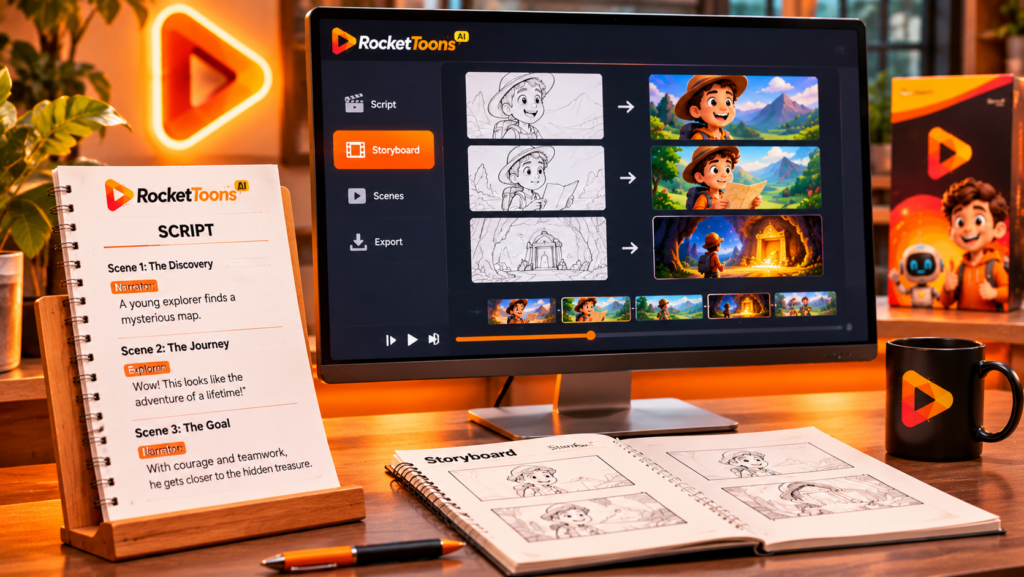
Yes, you can turn an existing script into an animated cartoon video by converting the written story into individual scenes, creating characters, assigning dialogue, choosing a visual style, and adding animation, voices, and sound. You do not have to write a completely new story just because you want to turn your existing words into a video. An AI-assisted cartoon creation platform such as RocketToons AI can help you explore a workflow that brings scripts, cartoon characters, scenes, and voice production together.
Perhaps you already have a children’s story, a business presentation, an educational lesson, a short screenplay, or a script you originally planned to use for a YouTube video. Instead of leaving that material as text, you can adapt it into a visual experience with characters, expressions, dialogue, and animated scenes.
What Does It Mean to Turn a Script Into an Animated Cartoon Video?
Turning a script into a cartoon video means translating written descriptions and dialogue into visual scenes that viewers can watch. The script provides the foundation, while the animation gives the story a visual identity.
The process generally involves:
- Script analysis: Identify the characters, locations, dialogue, and important events.
- Scene planning: Divide the script into individual visual sequences.
- Character creation: Design cartoon characters that fit the story.
- Visual direction: Choose animation styles, backgrounds, actions, and camera perspectives.
- Voice production: Assign narration and dialogue to the appropriate characters.
- Animation and editing: Bring the scenes together into a complete video.
The objective is not simply to illustrate every sentence. It is to communicate the meaning of the script through visual storytelling.
How to Turn an Existing Script Into a Cartoon Video in 7 Steps
Step 1: Review and Prepare Your Existing Script
Start by reading your script from beginning to end. Identify the main message, characters, important events, and intended audience.
Not every written script is immediately suitable for animation. A document written for a presentation, blog post, or voiceover may need some restructuring before it becomes a visual story.
Look for:
- Long paragraphs that could be divided into shorter scenes.
- Dialogue that sounds too formal when spoken aloud.
- Descriptions that could be communicated visually.
- Important events that need their own animated sequences.
- Information that can be simplified without changing the original message.
Preserve the central meaning of your original script while making it easier to translate into scenes.
Step 2: Break the Script Into Individual Scenes
A script may contain several paragraphs, but an animated video needs a sequence of visual moments. Divide the material into scenes based on changes in location, action, character, or subject.
For example, imagine you have a script explaining how plants grow.
- Scene 1: A cartoon gardener introduces a small seed.
- Scene 2: The seed is planted in the soil.
- Scene 3: The character explains the role of water and sunlight.
- Scene 4: A small plant begins to grow.
- Scene 5: The gardener summarizes the lesson.
This scene-by-scene approach makes it easier to plan the visuals and maintain a logical flow.
Step 3: Create Characters That Match the Script
Next, identify everyone who appears in the story. Decide whether the video needs a main character, supporting characters, a narrator, or a cartoon presenter.
Give each character a clear visual identity. Consider appearance, clothing, colors, personality, and role in the story.
For a recurring series, consistency becomes particularly important. The same character should remain recognizable across different scenes and episodes.
Where your animation platform supports character references or custom character creation, use those options to guide the visual design. Review the generated scenes for changes in facial features, clothing, and other recognizable details.
Step 4: Choose the Cartoon Animation Style
The visual style should reflect the purpose of your script. A children’s story might benefit from colorful storybook visuals, while a business explainer could use a cleaner cartoon presentation.
Popular approaches include:
- 3D cartoon: Expressive characters and dimensional environments.
- 2D animation: Simple illustrations and clear visual communication.
- Storybook style: Warm, imaginative visuals for storytelling.
- Comic-inspired animation: Bold characters and dramatic visual effects.
- Anime-inspired visuals: Stylized characters and expressive scenes.
Choose a style that supports the message and remains consistent throughout the video.
Step 5: Add Dialogue, Narration, and Character Voices
Once the scenes and characters are planned, decide which lines should be spoken by individual characters and which should be delivered by a narrator.
Keep the dialogue natural and conversational. Long sentences may work in a written document but can become difficult to follow when spoken by an animated character.
For example, a written sentence such as “The process of recycling helps reduce the amount of waste sent to landfills” could become a short exchange:
Character: “Do you know why recycling matters?”
Narrator: “It helps us reuse materials and reduce waste.”
Choose voices that suit the characters and intended audience. Preview the generated audio to check pronunciation, speaking speed, and emotional tone.
Step 6: Generate and Refine the Animated Scenes
Now bring the individual elements together. Generate or create the scenes using your script, character descriptions, visual references, and action instructions.
Review each scene carefully. Check whether the characters are performing the intended actions, whether the backgrounds support the story, and whether the dialogue matches the visuals.
If a scene does not communicate the right idea, refine its instructions and generate another version where the available tools allow it. You may also need to adjust scene duration, camera direction, and character actions.
Step 7: Edit, Preview, and Export the Finished Video
Once all the scenes are ready, review the complete sequence. Check the story flow, voice quality, scene transitions, and background music.
Make sure there are no unnecessary pauses, repeated scenes, or confusing visual changes. Add captions if they improve accessibility or help viewers understand the content.
Finally, choose an export format suitable for your intended platform. A horizontal video may suit standard YouTube content, while a vertical version may be more appropriate for Shorts and Reels.
How RocketToons AI Can Help Convert Scripts Into Cartoon Videos
RocketToons AI is an AI-powered cartoon video creation platform designed to combine script assistance, character creation, animated scenes, voices, and video production.
Its advertised workflow includes an AI script writer, character customization, scene development, voice options, storyboard previews, and controls for refining individual scenes. These features may be useful when adapting an existing written idea into an animated video.
For example, you could begin with a prepared educational script, identify the characters and scenes, develop the cartoon visuals, add dialogue, and review the storyboard before producing the finished video.
The platform also advertises controls for adjusting elements such as character actions, camera direction, sound effects, and clip length. These can be useful when refining how the written script is represented visually.
However, an existing script may still require editing and restructuring before it works well as animation. Do not assume that every document can be converted perfectly with a single upload or instruction. Check the current workflow and available features in the plan you are considering.
For a closer look at the platform, its advertised features, workflow, and buying considerations, read our complete RocketToons AI review.
What Types of Existing Scripts Can Become Cartoon Videos?
- Children’s stories: Turn written stories into animated adventures with recurring characters.
- Educational scripts: Explain science, mathematics, language, and other subjects through visual examples.
- Business presentations: Convert important messages into cartoon explainers and promotional videos.
- YouTube scripts: Adapt narration and storytelling into faceless animated content.
- Training material: Present workplace procedures and instructions through illustrated scenarios.
- Marketing scripts: Turn product explanations and service descriptions into animated promotional content.
Common Mistakes to Avoid When Converting a Script Into Animation
- Using the script without adaptation: Written content often needs shorter dialogue and clearer visual instructions.
- Creating too many scenes: Break the story logically without making the production unnecessarily complicated.
- Ignoring character consistency: Maintain recognizable character descriptions and references.
- Choosing an unsuitable visual style: Make sure the animation supports the audience and subject.
- Forgetting audio quality: Check narration, character voices, music, and sound effects.
- Skipping the final review: Watch the entire video before publishing.
FAQs About Turning Existing Scripts Into Animated Cartoon Videos
Can I turn a written script into a cartoon video using AI?
Yes. AI-assisted animation tools can help transform written ideas and scripts into characters, scenes, dialogue, and animated video. The workflow and level of automation depend on the platform.
Do I need to rewrite my script before animating it?
Not always, but most scripts benefit from some adaptation. Shorter dialogue, clearer scene descriptions, and visual storytelling instructions can make the material easier to animate.
Can I turn a YouTube voiceover script into a cartoon video?
Yes. You can divide the narration into scenes, create visuals that illustrate each section, and add character dialogue or voiceover. This can be useful for faceless YouTube content and educational explainers.
Can AI create cartoon characters from my existing story?
AI-assisted character creation tools can help develop characters based on written descriptions and supported visual references. You should review the results to ensure the characters match your story and remain consistent.
Can I use my animated cartoon video commercially?
That depends on the software’s license, the assets used, and any applicable third-party rights. Check the specific commercial-use terms before using the finished video for client projects, advertising, or other business purposes.
Final Thoughts: Your Existing Script Could Be Your Next Animated Video
You do not always need a new idea to create something visually engaging. Sometimes, the best starting point is a script you have already written. It could be a story, a lesson, a presentation, or a voiceover that simply needs a new format.
Start by understanding the message, dividing it into scenes, creating suitable characters, and matching the dialogue to the visuals. Then refine the animation until the finished video communicates the original idea clearly.
RocketToons AI is worth exploring if you want to investigate an AI-assisted workflow that combines script development, cartoon characters, scene creation, voices, and video production. To learn more about the platform and examine its advertised features and buying considerations, visit our RocketToons AI review.