
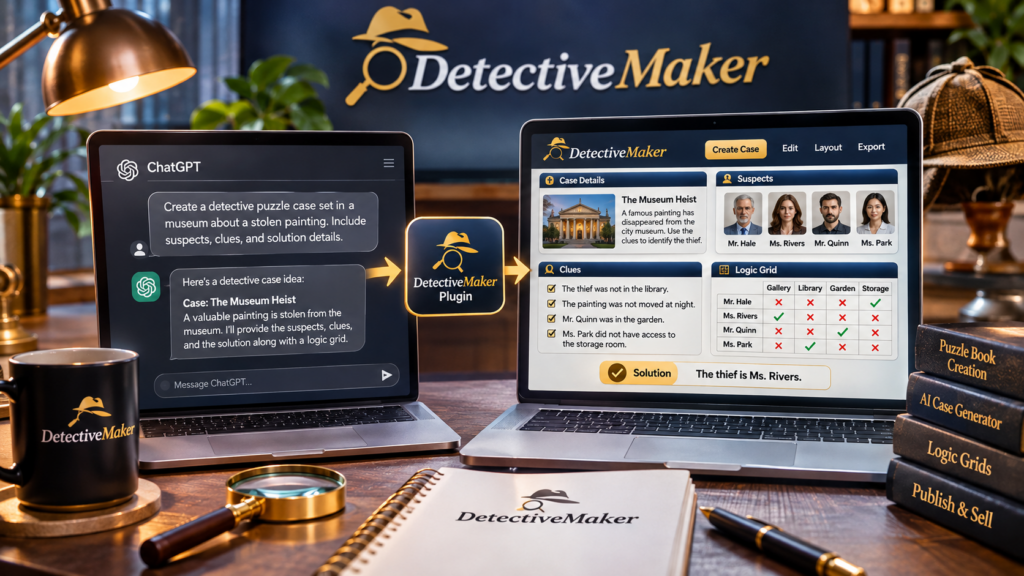
Yes, Detective Maker can support AI-assisted detective puzzle creation through its included Detective JSON Maker MCP plugin, which comes with setup instructions. MCP (Model Context Protocol) provides a way for compatible AI applications to connect with external tools, making it possible to use an AI-assisted workflow for generating structured detective puzzle content. Detective Maker is designed to create case stories, suspects, weapons, locations, clues, evidence, deduction grids and solutions. You can explore Detective Maker and its included MCP plugin to see whether its workflow suits your puzzle creation plans.
What Is the Detective Maker MCP Plugin?
MCP stands for Model Context Protocol. It is a method that allows compatible AI applications to communicate with external tools and services through a defined connection. Instead of relying only on a normal chat conversation, an AI application can use an available MCP tool to interact with supported functionality.
Detective Maker includes a plugin called Detective JSON Maker MCP. According to the supplied product information, the plugin is included with the purchase and comes with setup instructions.
The purpose of this integration is to support an AI-assisted workflow for creating detective puzzle content. However, the exact connection steps, supported ChatGPT configurations and individual MCP commands should be checked against the supplied setup documentation. The available product information does not establish that every ChatGPT account or configuration supports the same connection process.
What Can You Create With AI and Detective Maker?
Detective Maker focuses on structured mystery and deduction puzzles rather than ordinary story generation alone. Its AI-assisted creation features cover several connected puzzle components.
- Detective case stories: Generate the narrative that introduces the mystery.
- Suspects: Create the characters readers must investigate.
- Weapons: Include possible weapons or objects connected to the case.
- Locations: Establish the places involved in the mystery.
- Clues: Provide information that helps readers eliminate possibilities.
- Evidence: Add supporting details for the investigation.
- Deduction grids: Organize the information into a structured logic puzzle.
- Solutions: Include the intended answer to the mystery.
This combination is useful because a detective puzzle needs more than an interesting story. It also needs consistent details, clues that support the answer and a clear way for readers to work through the possibilities.
How Does an AI-Assisted Detective Puzzle Workflow Work?
The general workflow involves connecting the available AI tool, generating the puzzle material, reviewing the output and refining the final layout. The following steps provide a practical overview without assuming undocumented MCP commands or setup screens.
Step 1: Review the MCP Setup Instructions
Start by locating the Detective JSON Maker MCP setup instructions included with the product. Check the stated requirements and confirm that your chosen AI application and environment support the required MCP connection.
Do not assume that installing an MCP plugin automatically connects every AI application. Follow the documented configuration process for your particular setup.
Step 2: Develop Your Detective Case Concept
Decide what type of mystery you want to create. You might begin with a theft, a missing object or another fictional investigation. Consider the number of suspects, possible locations and the kind of deduction challenge you want readers to solve.
A focused concept gives the AI workflow a clearer creative direction and makes it easier to review the generated result.
Step 3: Generate the Puzzle Components
Use the available Detective Maker AI workflow to develop the case material. The intended output can include a story, suspects, weapons, locations, clues, evidence, a deduction grid and a solution.
Check that the generated elements belong to the same mystery. For example, every suspect mentioned in the clues should be represented consistently in the puzzle structure.
Step 4: Review the Logic and Solution
AI-generated detective puzzles still require human review. Read the clues, compare them with the deduction grid and test whether they support the intended answer. Look for contradictions, missing details and ambiguous solutions.
Step 5: Refine the Pages in Detective Maker
Detective Maker also includes a visual editor. You can modify generated content, arrange page elements using drag-and-drop blocks, adjust book size and margins, manage page numbering and control solution display. You can also add pages to your project.
What If You Do Not Want to Use the MCP Plugin?
The MCP plugin is not the only AI option described in the product information. Detective Maker provides three approaches:
- Detective JSON Maker MCP: The included plugin with setup instructions.
- Your own API key: Connect an API key from a supported AI provider, subject to any separate provider usage charges.
- Built-in BrosAI: Use the integrated AI option, which includes 500 starting credits. An optional 7,000-credit plan is listed at $15 per month for use across The Bros Studio tools.
These alternatives give users different ways to approach AI-assisted puzzle creation. If you want to compare the complete feature set and understand the available product versions, read the detailed Detective Maker review and upgrade breakdown.
Frequently Asked Questions
Is the Detective Maker MCP plugin included?
Yes. The supplied product information states that the Detective JSON Maker MCP plugin is included with the purchase and comes with setup instructions.
Can ChatGPT connect to Detective Maker through MCP?
The product includes an MCP plugin, but the exact ChatGPT compatibility and configuration requirements should be confirmed using its setup documentation. Support can depend on the AI application and environment being used.
Does the MCP plugin generate complete detective puzzles?
Detective Maker supports the generation of case stories, suspects, weapons, locations, clues, evidence, deduction grids and solutions. The exact capabilities available through individual MCP commands should be checked in the plugin documentation.
Do AI-generated detective puzzles need editing?
Yes. Review the story, clues, grid and solution for logical consistency before publishing. The visual editor allows you to modify generated content and refine the page presentation.
Final Thoughts
Detective Maker combines AI-assisted detective puzzle generation with an included MCP plugin and a visual editing environment. Its workflow can help creators develop structured mystery content, including case stories, clues, deduction grids and solutions. The important consideration is to follow the actual MCP setup instructions, confirm compatibility with your chosen AI environment and review every generated puzzle before publishing. For a broader look at its features, pricing and available upgrades, visit the complete Detective Maker review and product guide.