
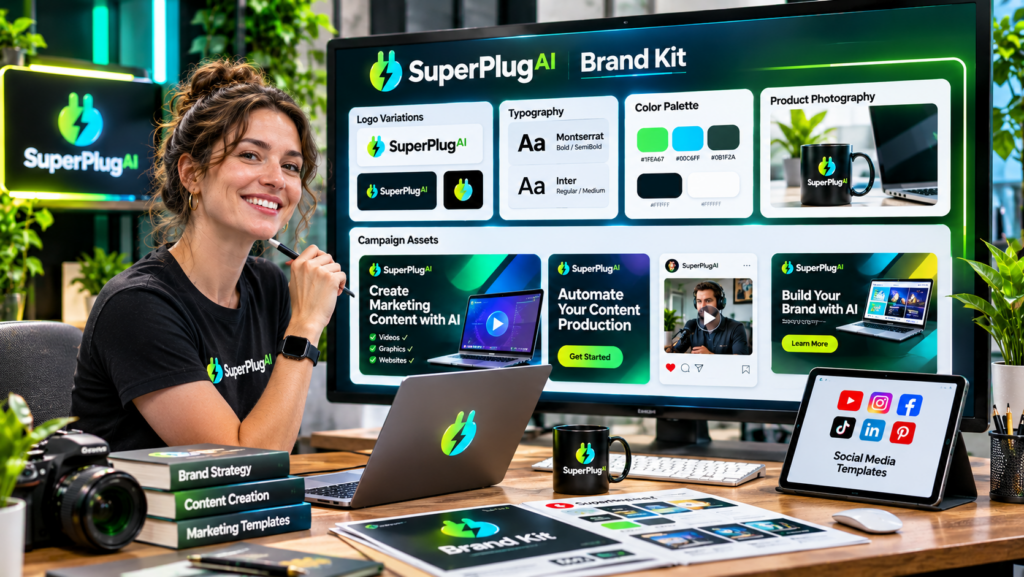
You can create a brand kit with SuperPlug AI by providing your brand assets and identity details, including your logo, colours, fonts and preferred tone of voice, then saving them in its Brand Kit Memory feature. This helps maintain a consistent visual identity across marketing graphics, videos, presentations and other creative projects. SuperPlug AI’s Premium features highlight the ability to save up to three brand kits for repeated use. Explore SuperPlug AI and its brand management capabilities.
Whether you are a freelancer, content creator, ecommerce seller or marketing agency, a consistent brand identity makes your content easier to recognise. This tutorial explains how to prepare your brand information, create a brand kit and use it across different marketing assets with SuperPlug AI.
What Is a Brand Kit in SuperPlug AI?
A brand kit is a collection of visual and messaging guidelines that helps keep your marketing materials consistent. Instead of explaining your brand preferences every time you create a new graphic or video, you can save important details and reuse them in supported workflows.
SuperPlug AI’s Brand Kit Memory is designed to store key brand information, including:
- Logo: Your business logo or approved brand variations.
- Colours: Your primary and secondary brand colour palette.
- Fonts: Typography choices for headings and supporting text.
- Tone of voice: The personality and communication style your content should follow.
According to the product materials, Premium users can save up to three brand kits. This can be useful if you manage multiple businesses, projects or client identities.
Step 1: Gather Your Brand Assets Before Starting
Before creating your brand kit, collect the essential materials that represent your business. Having these ready makes it easier to communicate your identity accurately.
Prepare the following:
- Your main logo in a clear, high-quality format.
- Your primary brand colour and supporting colours.
- The names or files for your preferred fonts.
- A short description of your business and target audience.
- Examples of the tone you want your marketing content to use.
For example, a premium skincare brand might use neutral colours, elegant typography and a calm, sophisticated tone. A fitness business might prefer bold colours, energetic messaging and strong visual contrasts.
Step 2: Connect SuperPlug AI to Your AI Assistant
SuperPlug AI connects supported AI assistants, including ChatGPT, Claude and Grok, with its creative production tools through Model Context Protocol (MCP).
- Sign in to your SuperPlug AI account.
- Locate your personal MCP connection instructions.
- Copy the connection details supplied for your account.
- Add the connection through the supported settings in your preferred AI assistant.
- Complete authentication and enable the connector.
After connecting, you can request supported creative tasks through a conversational interface. The available features depend on your account and enabled integrations.
Step 3: Create Your Brand Kit
Start a conversation with your connected AI assistant and explain that you want to create a brand kit for your business.
Provide your logo and the other brand information you prepared. Clearly identify your primary colours, secondary colours, typography preferences and communication style.
For example, you could use this prompt:
Create a brand kit for my online marketing business. Use my uploaded logo as the main brand reference. My primary colours are navy blue and white, with gold as an accent colour. Use clean, modern typography and a professional but approachable tone of voice. Apply these brand guidelines consistently to future marketing graphics, promotional videos, presentations and social media content.
Adjust the example to reflect your actual business identity. Review the proposed brand information and make corrections before saving it through the supported Brand Kit Memory workflow.
Step 4: Review and Save Your Brand Guidelines
Before relying on your brand kit for future projects, check that the stored information accurately represents your business.
Pay attention to these details:
- Logo accuracy: Make sure the correct logo and variation are being used.
- Colour consistency: Check that the primary and accent colours are clearly identified.
- Typography: Confirm that your preferred fonts are correctly described.
- Brand voice: Make sure the tone reflects how your business communicates.
- Usage guidelines: Explain how the brand should appear in different marketing formats.
Once everything looks correct, save the brand information using the available Brand Kit Memory workflow. The purpose is to make these preferences reusable instead of repeatedly entering the same instructions for every project.
Step 5: Use Your Brand Kit Across Marketing Content
After creating your brand kit, apply it to different creative projects supported by SuperPlug AI.
- Social media graphics: Create promotional posts using your brand colours and logo.
- YouTube thumbnails: Maintain consistent typography, colours and visual identity.
- Promotional videos: Apply your preferred creative direction to video assets.
- Presentations: Produce business slides that follow your visual guidelines.
- Marketing campaigns: Develop coordinated promotional assets for product launches and campaigns.
- Website projects: Use your brand identity as a reference when creating supported website and landing-page workflows.
For example, you could request a social media campaign containing several promotional graphics and ask the assistant to follow your saved brand guidelines. Review the proposed plan and output to ensure the brand identity remains consistent.
To explore how Brand Kit Memory fits into the platform’s other creative tools, integrations, pricing and upgrades, read the complete SuperPlug AI review and feature breakdown.
Tips for Maintaining Consistent Marketing Content
- Keep your guidelines simple: Define a clear colour palette, typography system and tone of voice.
- Use approved logo versions: Avoid mixing outdated or unofficial logos into new campaigns.
- Be specific about tone: Describe whether your brand should sound friendly, premium, technical or energetic.
- Review generated assets: Check every graphic, video and presentation before publishing.
- Update your brand information: Revise saved guidelines when your visual identity changes.
- Separate different brands: Use distinct brand kits for separate businesses or client projects where supported.
Frequently Asked Questions
How many brand kits can I save in SuperPlug AI?
SuperPlug AI’s Premium feature information highlights Brand Kit Memory with support for up to three saved brands.
What information can a SuperPlug AI brand kit store?
The listed brand information includes logos, colours, fonts and tone of voice. These details help guide supported creative workflows.
Can I use my brand kit for YouTube thumbnails and social media graphics?
Yes. You can use your saved brand guidelines as a reference for supported graphic and marketing content workflows, including thumbnails and social media creatives.
Is Brand Kit Memory useful for marketing agencies?
It can be useful for managing multiple brand identities. SuperPlug AI’s Premium materials describe support for up to three brand kits, while its agency offering includes client-oriented brand and project management features.
Final Thoughts
Creating a brand kit with SuperPlug AI gives you a practical way to keep your marketing content aligned with your business identity. Prepare your logo, colours, fonts and tone of voice, save them through Brand Kit Memory and use those guidelines when creating supported graphics, videos, presentations and promotional assets.
For a complete overview of SuperPlug AI’s features, Brand Kit Memory, pricing, integrations and available upgrades, read the full SuperPlug AI review.