
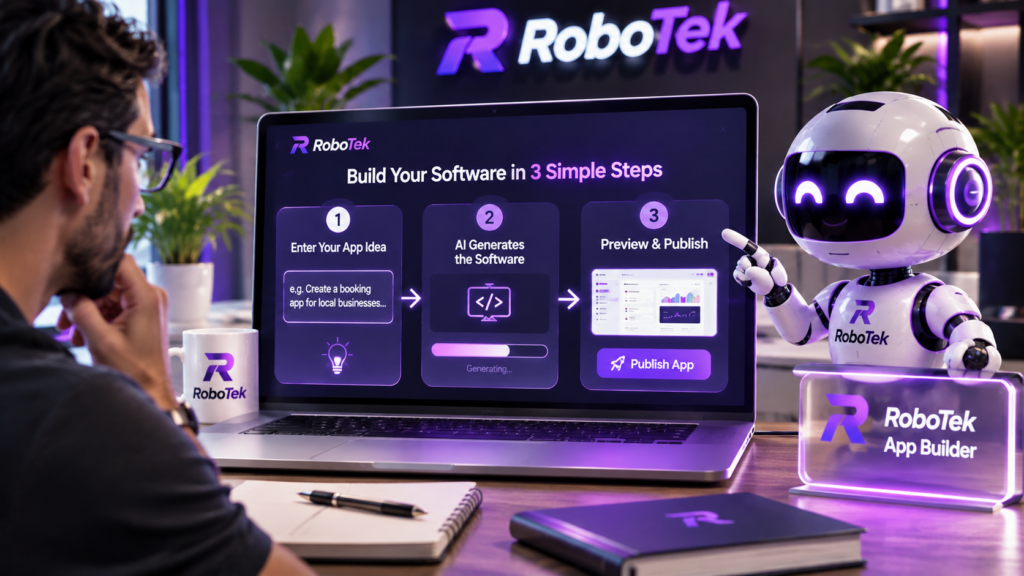
You can create and publish an app with RoboTek by describing your software idea, using its integrated AI coding assistants to generate the application, and then previewing, editing, and preparing it for publishing. RoboTek is designed to simplify this process for beginners, entrepreneurs, and freelancers who want to create software without manually writing programming code. Its cloud-based dashboard brings more than 10 coding-specific AI assistants together, making it possible to explore SaaS applications, mobile apps, WordPress plugins, games, and other software projects.
Get access to RoboTek here and explore its AI-powered application creation workflow.
What Is RoboTek and How Does Its App Builder Work?
RoboTek is an AI-powered software development platform that combines multiple coding-specific AI assistants within one cloud-based dashboard.
Instead of starting with a blank code editor, you describe the application you want to create and use the integrated AI tools to generate the software.
The advertised platform includes access to AI assistants such as Claude, ChatGPT, Gemini, Grok, Microsoft Copilot, Cursor AI, GitHub Copilot, Bubble AI, and RoboTek’s proprietary AI.
It also advertises support for more than 20 programming languages and multiple software categories.
The overall process follows three main stages:
- Enter your application idea and requirements.
- Use AI to generate and customize the software.
- Preview, test, and prepare the application for publishing.
RoboTek Walkthrough: How to Create an App Step by Step
Step 1: Access the RoboTek Dashboard
After purchasing RoboTek, follow the access instructions to enter the cloud-based application.
The dashboard brings the platform’s AI development capabilities together, giving you a central workspace for exploring and creating different software projects.
You don’t need to begin by installing a traditional development environment or configuring your own coding tools.
Start by identifying the type of application you want to build.
For example, you might want to create:
- A customer management application.
- A SaaS productivity tool.
- An appointment booking system.
- A marketing analytics dashboard.
- A mobile application.
- A WordPress plugin.
Step 2: Describe Your App Idea
This is where the AI-assisted workflow becomes useful.
Instead of manually programming the application, explain what you want it to do.
For example, imagine creating an appointment management application for a small business.
Your initial instructions could include:
- A homepage explaining the application.
- A user registration and login system.
- An appointment booking dashboard.
- A customer management section.
- An administrator dashboard.
- Appointment status notifications.
Be specific about the functionality you need. Clear requirements make it easier to communicate your intended application structure and identify what needs to be developed.
Step 3: Let the AI Generate Your Application
Once you have described the requirements, use RoboTek’s integrated AI coding assistants to help generate the application.
The platform advertises support for more than 20 programming languages, making it suitable for exploring different types of software development projects.
You can use the AI-assisted workflow to generate application components, develop functionality, and refine the output based on your requirements.
This is particularly useful for beginners who want to move beyond the idea stage without having to manually write every line of code.
Step 4: Preview and Customize Your App
Once the initial application has been generated, the next step is to inspect it.
RoboTek advertises one-click preview functionality, allowing you to review your application as you work on it.
Its live editor also allows you to modify text and images directly on the page.
Before proceeding, check important elements such as:
- Navigation and page layouts.
- Registration and login functionality.
- Dashboard interactions.
- Forms and user inputs.
- Data storage and retrieval.
- Payment and subscription workflows, if applicable.
- Mobile responsiveness.
The platform also advertises a smart checkup feature designed to identify and help fix broken links.
Remember that generated applications should be tested for functionality, security, and reliability before being released to customers.
Step 5: Prepare Your Application for Publishing
Once the application is ready, you can move toward publishing.
RoboTek advertises one-click publishing capabilities, private sharing links, and opportunities to distribute applications through its King Maker app store and supported marketplaces.
Depending on the application you create, additional configuration may be required for hosting, domains, databases, security, payment processing, and deployment.
For mobile applications, publishing through Google Play or the Apple App Store also involves meeting the respective platform’s submission and approval requirements.
What Types of Apps Can You Create With RoboTek?
One of the interesting aspects of RoboTek is its range of advertised application categories.
SaaS Applications
Create software concepts designed around recurring business problems, such as productivity tools, customer dashboards, and specialized management applications.
Mobile Applications
Explore creating Android and iOS applications for businesses, consumers, and niche audiences.
WordPress Plugins
Develop ideas for custom WordPress functionality, website utilities, and marketing-related extensions.
Cloud-Based Software
Explore browser-based applications that users can access through an online interface.
Web Games
Experiment with browser-based games and interactive software projects.
Marketing and Productivity Tools
Create application concepts designed for marketers, content creators, online businesses, and professionals.
Can You Sell the Apps You Create With RoboTek?
Yes. RoboTek advertises a commercial license with its front-end package, making it particularly relevant to people who want to create software for commercial purposes.
Potential business opportunities include:
- Selling custom applications to local businesses.
- Developing niche SaaS products.
- Offering AI-assisted software development services.
- Creating specialized WordPress plugins.
- Building productivity tools for specific audiences.
- Developing software products for digital marketplaces.
The optional PRO upgrade also advertises subscription program and automated upsell features for users interested in expanding their software business.
If your objective is to build and monetize applications rather than simply experiment with AI, the commercial licensing aspect is an important reason to explore RoboTek.
Tips for Getting Better Results From RoboTek
Here are some practical recommendations to help you approach your first application project:
- Start with one clear problem: Choose a specific audience and identify a problem your application should solve.
- Write detailed requirements: Explain the screens, functions, inputs, and expected results.
- Build incrementally: Start with the essential functionality before adding advanced features.
- Test every important workflow: Check user accounts, forms, data handling, and payment functionality.
- Improve based on feedback: Let potential users try the application and identify areas that need improvement.
These steps will help you approach AI-assisted software development as a structured process instead of expecting a complicated application to be perfect after a single prompt.
Is RoboTek Worth Trying for App Development?
If you want to explore creating software without beginning with traditional programming, RoboTek offers an interesting collection of tools.
Its combination of multiple coding-specific AI assistants, support for different application categories, preview and editing features, commercial licensing, and publishing opportunities makes it relevant to beginners and aspiring software entrepreneurs.
You can start with a simple application, learn how the AI development workflow operates, and gradually explore more ambitious software projects.
For a complete breakdown of the front-end offer, features, pricing, OTOs, bonuses, and buying recommendation, read our complete RoboTek Review 2026.
Final Thoughts: Start Creating Your First App With RoboTek
You don’t need to spend months learning programming before exploring your first software idea.
With RoboTek, you can describe the application you want, use integrated AI coding assistants to help generate it, review the output, and work toward publishing your finished project.
Whether you want to create SaaS applications, mobile apps, WordPress plugins, or custom software for clients, the platform gives you several directions to explore.
My recommendation is to start with one useful application idea, follow the workflow, test your results, and gradually build your confidence with the platform.
Ready to see what you can create? Explore the RoboTek offer and start working on your first AI-assisted software project.
For the complete product breakdown and buying recommendation, visit our RoboTek Review 2026: Features, Pricing, OTOs, Bonuses & Verdict.