
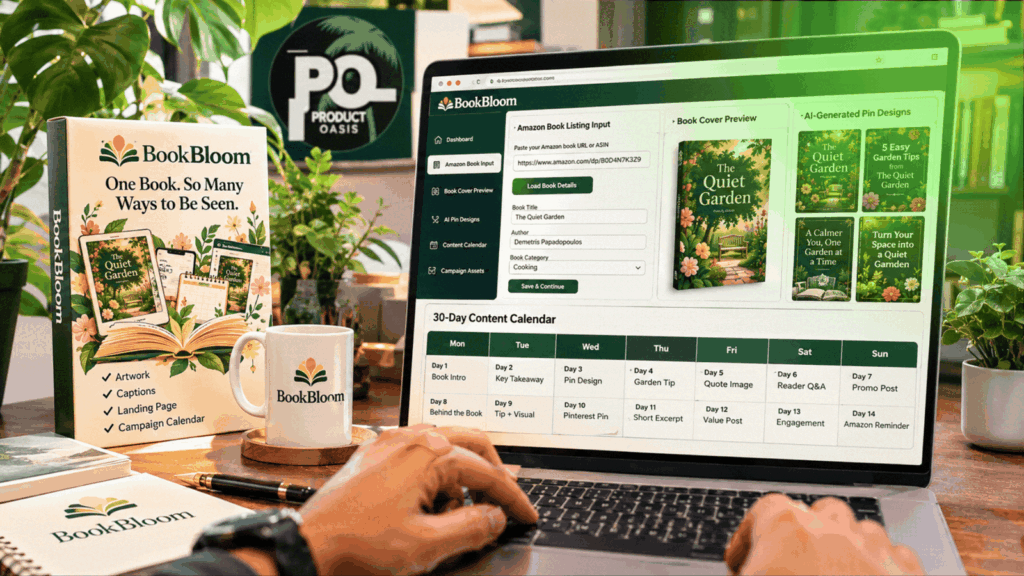
BookBloom AI is a book-promotion platform that turns your existing book information into a structured Pinterest marketing campaign, including promotional angles, pin artwork, captions, a 30-day calendar and a dedicated book landing page. Instead of planning every promotional post manually, you provide your book details, customise the campaign and prepare the content for publishing. You can explore BookBloom and access the current offer here.
What Happens When You Open BookBloom?
BookBloom is designed around a straightforward idea: one published book contains multiple useful promotional angles. A practical guide, for example, can be promoted through its tips, solutions, sample content, reader benefits and specific topics. BookBloom helps turn those angles into a collection of campaign assets.
The platform works through a browser-based dashboard. You start with a book, provide the relevant information and move through the campaign-building stages. The result is a set of promotional materials organised around that title, rather than a collection of unrelated social media posts.
BookBloom AI Walkthrough: How It Works Step by Step
Step 1: Add Your Book
Begin by creating a campaign for the book you want to promote. You can provide an Amazon book URL and use a PDF or opening chapters to give the system more information about the content.
This is an important part of the process. The more accurately the platform understands the book, its subject and its intended readers, the more relevant the promotional angles can be.
Step 2: Generate Promotional Angles
BookBloom’s promotion strategist helps identify different ways to present the book. These can include practical tips, reader problems, useful insights, curiosity-led hooks and other themes drawn from the book material.
Instead of repeating the same sales message, you get a variety of approaches to use throughout the campaign. You can review the suggestions and refine the direction before generating the assets.
Step 3: Choose Your Pinterest Design Styles
Next, move to the artwork stage. BookBloom provides design previews using your book cover, allowing you to select the visual styles that best suit the title and its audience.
You can choose between three and five styles and generate the corresponding promotional artwork. The aim is to create a visually varied collection of pins while keeping the actual book cover recognisable.
Step 4: Create Headlines and Captions
The AI copywriter prepares promotional hooks, headlines, captions, calls to action and relevant keyword phrases. These give each campaign piece its own message and help connect the visual with a reason for readers to explore the book.
You are not locked into the first generated version. Review the wording, edit anything that needs improvement and retain the copy that best represents your book.
Step 5: Prepare Your Book Landing Page
BookBloom can create a hosted landing page for the book, with its cover, promotional information and links to the stores where readers can find it. The page also provides an area for an email-list opt-in.
You can review and edit the page, and download its files for hosting options that suit your setup. This gives your Pinterest campaign a dedicated destination rather than relying only on a generic social profile.
Step 6: Organise the 30-Day Campaign
Once the promotional assets are ready, BookBloom organises them into a dated publishing calendar. You can review the schedule, adjust campaign items and keep track of what has been published.
The calendar can be exported as a CSV file for use in the Pinterest publishing workflow. BookBloom prepares the campaign and publishing materials; you review and complete the publishing process through your Pinterest account or supported scheduler.
Step 7: Track Campaign Activity
BookBloom includes basic tracking for page views and clicks associated with campaign pieces. This helps you identify which promotional angles are attracting attention and which may need improvement.
Remember that clicks are engagement signals, not confirmed book purchases. Use the information to refine your messaging and plan future campaigns more intelligently.
Watch the Official BookBloom Demo
If you prefer seeing the dashboard and workflow rather than simply reading about the steps, the official demonstration below is the best place to get a visual overview.
What Else Can You Do Inside BookBloom?
The campaign workflow is the central feature, but BookBloom also includes tools that can support other parts of book promotion:
- Promotion Finder: helps identify free promotional channels and prepare submission materials based on their requirements.
- Free Channel Catalog: provides a directory of book-promotion opportunities and their stated guidelines.
- KDP Research: helps examine comparable Amazon book listings and develop title and keyword ideas.
- Book Website: lets you build a broader online presence for your books, with individual book pages and author information.
- Campaign Library: gives you a place to manage and revisit your generated promotional material.
Is BookBloom Easy for a Beginner?
The workflow is divided into clear stages: add your book, prepare the promotional angles, choose designs, generate copy, review the landing page and organise the calendar. This makes the process easier to follow than managing each task independently across several tools.
You do not need to be a professional graphic designer or an experienced copywriter to begin. However, you should still understand your book’s audience and take time to review the generated content. Good promotional material needs to accurately represent what readers will find inside the book.
Where to Go From Here
BookBloom makes the most sense when you already have a published book and want a repeatable way to promote it. Its main benefit is bringing campaign planning, Pinterest artwork, promotional copy, landing-page preparation and scheduling materials into one connected workflow.
If you want to compare the available features, front-end price, optional upgrades, bonuses and overall value before making your decision, read the complete BookBloom Review 2026 with its pricing breakdown and final verdict.
Ready to see what the platform can do with your own book? Visit the full BookBloom review and see whether it is the right fit for your publishing workflow.