
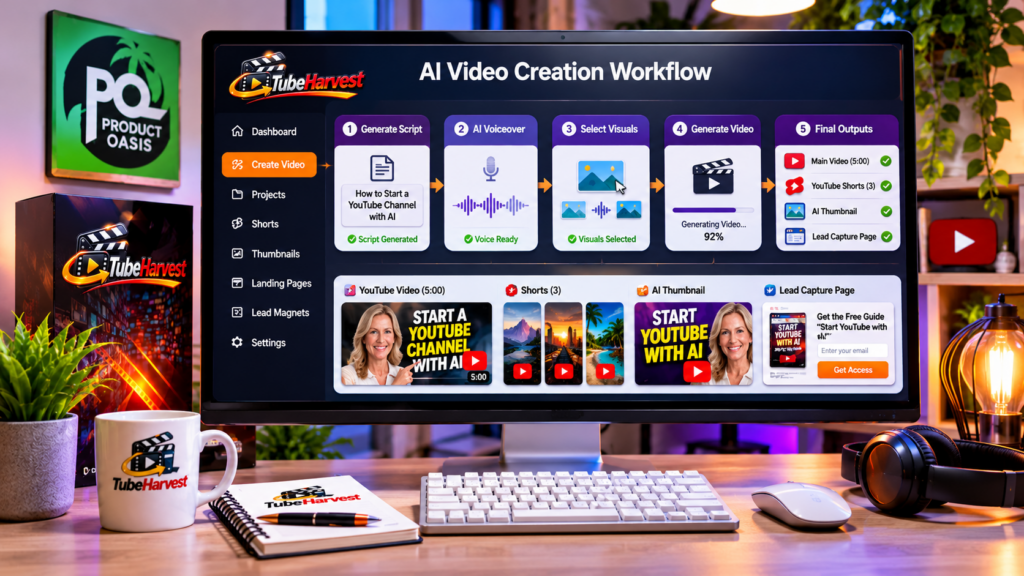
Step-by-Step Tutorial · AI Video Creation
TubeHarvest transforms a single topic into a complete faceless YouTube package by generating a video script, AI voiceover, matching visuals, captions, vertical Shorts, a thumbnail, SEO metadata, an email capture landing page and a corresponding PDF lead magnet. This TubeHarvest demo and walkthrough explains how to use these connected assets to simplify video production, publish consistently and build an email audience without filming yourself.
TubeHarvest Demo: What Does One Topic Generate?
The TubeHarvest Commercial edition is designed to generate an entire content package rather than a standalone video. Each package provides the following core deliverables.
SEO titles, descriptions, tags and social media captions complete the package, helping you prepare your content for distribution across multiple formats.
Step 1: Choose and Enter Your Video Topic
Begin by accessing the cloud-based TubeHarvest application and choosing a subject that addresses a specific audience problem.
Example topic inputs
Choose a focused topic with a clear outcome. Specific questions make it easier to develop useful video content and a relevant downloadable resource.
Step 2: Generate Your AI Faceless YouTube Video
TubeHarvest uses your chosen topic to generate the essential components of a narrated video, reducing the need to coordinate separate scripting, recording and editing workflows.
AI Scriptwriting
Develops a structured narration around your selected subject.
AI Voiceover
Creates spoken narration without requiring a microphone or recording session.
Matching Visuals
Combines visual material with the generated narration.
Video Captions
Adds on-screen captions to support the viewing experience.
Step 3: Create YouTube Shorts, Thumbnails and SEO Content
TubeHarvest extends the main video into multiple supporting assets. These help you present the same topic through different content formats.
| Generated Asset | Practical Application |
|---|---|
| YouTube Shorts | Introduce individual ideas through vertical videos. |
| Thumbnail | Communicate the main video’s subject visually. |
| SEO Title and Description | Describe the topic and its relevance to viewers. |
| Video Tags | Provide additional topic context. |
| Social Captions | Prepare promotional posts for social platforms. |
Want to Watch the Official TubeHarvest Demo?
Explore the official demonstration videos, complete feature breakdown, pricing, upgrades and exclusive bonuses.
Step 4: Create Your Email Capture Page and PDF Lead Magnet
This is where TubeHarvest extends beyond conventional AI video generators. Each content package includes a matching landing page and a topic-specific PDF guide.
Instead of relying exclusively on YouTube advertising revenue, you can use your content to introduce relevant resources and develop an audience you can reach through email.
TubeHarvest Walkthrough: A Practical Content Creation Example
Imagine your chosen topic is How to Start Affiliate Marketing for Beginners. Here is an illustrative example of how you could organize the resulting content package.
Example Input
How to Start Affiliate Marketing for Beginners
A beginner-friendly explanation of affiliate marketing fundamentals.
Choosing a niche, finding affiliate products and attracting relevant traffic.
A beginner-focused visual and relevant publishing metadata.
A downloadable affiliate marketing starter checklist with a matching signup page.
One subject becomes the foundation for multiple videos, promotional assets and a targeted subscriber acquisition campaign.
Step 5: Review, Publish and Promote Your Content
Once the package is generated, prepare your content for publication using this simple checklist.
Pre-Publishing Checklist
- ✓ Review the script, narration and visual accuracy.
- ✓ Add original insights and relevant examples.
- ✓ Publish the main video with its thumbnail and metadata.
- ✓ Schedule supporting Shorts.
- ✓ Add the landing page link to your video description.
- ✓ Test your signup process before promoting it.
Frequently Asked Questions About the TubeHarvest Demo
Is TubeHarvest suitable for complete beginners?
Yes. Its topic-based workflow reduces the technical production tasks associated with creating faceless YouTube videos.
Do I need to record my own voice?
No. TubeHarvest includes AI-generated voice narration as part of its video production workflow.
How many Shorts does TubeHarvest generate?
Commercial includes three Shorts per package, while Premiere expands this to five Shorts.
Does TubeHarvest include a lead generation system?
Yes. Each package includes an email capture landing page and a corresponding PDF lead magnet.
Final Takeaway: Is the TubeHarvest Workflow Worth Using?
TubeHarvest is a compelling choice for creators who want to combine faceless YouTube video production with email audience building. Its greatest advantage is generating connected content and marketing assets from a single topic.
For affiliate marketers, entrepreneurs, freelancers and individual creators, this integrated workflow provides a practical foundation for consistent content production and lead generation.
One Topic. Multiple Assets. More Opportunities.
Ready to Build Your Faceless YouTube Content System?
Watch the official TubeHarvest walkthrough and explore the complete features, purchase options and exclusive bonuses.