
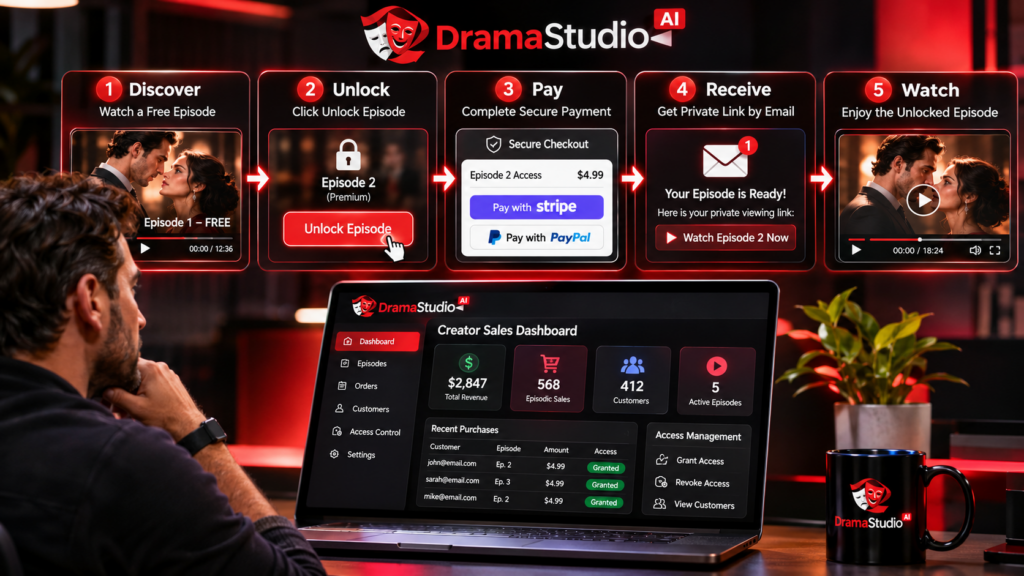
DramaStudioAI’s drama paywall lets creators offer selected episodes for free and charge viewers a one-time payment to unlock premium content. It supports subscriber access through connected Stripe or PayPal payment accounts, giving creators a way to monetize their AI-generated drama series through a branded streaming channel. Rather than relying only on social media views, you can present your episodes in one place and let viewers pay to access the rest of a show. Explore DramaStudioAI here to see how its content creation and monetization features work together.
What Is the DramaStudioAI Subscriber Payment and Access System?
DramaStudioAI combines AI drama production with a built-in streaming website and paywall feature. This allows creators to publish their shows through a branded channel and decide which episodes viewers can watch freely and which require payment.
The system is designed around a simple model: introduce viewers to a story with free content, then offer paid access to the remaining episodes. A viewer interested in continuing the drama can make a one-time payment to unlock the paid show or channel.
This gives independent creators an additional way to distribute their work and potentially generate revenue from their storytelling efforts.
How Does the DramaStudioAI Paywall Work?
The DramaStudioAI paywall works by separating free episodes from premium content. Creators decide how to structure access to their drama, while viewers pay to unlock the content that has been placed behind the paywall.
For example, imagine you create a five-episode romantic drama. You could make the first episode available for free so viewers can meet the characters and understand the conflict. The remaining episodes could be reserved for viewers who complete the one-time payment.
Once payment is completed through the supported payment setup, the viewer can access the paid content according to the channel’s configured access arrangement.
Which Payment Methods Does DramaStudioAI Support?
DramaStudioAI supports two payment integrations for collecting viewer payments:
- Stripe: Creators can connect a Stripe account to accept supported online payments from viewers.
- PayPal: Creators can also use a connected PayPal account as a payment option for paid drama access.
These integrations provide familiar payment options for audiences. The creator connects the relevant payment account and configures the paid-access arrangement for the show or channel.
Payment availability, supported currencies, transaction fees, and account eligibility can depend on the payment provider and the creator’s location. It is important to check those requirements before launching a paid channel.
How to Set Up Paid Drama Access in DramaStudioAI
Setting up a monetized drama channel involves preparing the content, organizing free and premium episodes, and configuring payment access. The general process follows these steps.
1. Create Your Drama Series
Start by developing your story using DramaStudioAI’s AI-powered production tools. Create the story, characters, scripts, scenes, voices, and videos. Review the finished episodes to make sure the series is ready for viewers.
2. Prepare Your Streaming Channel
Use the platform’s streaming website feature to establish your branded drama destination. Choose a recognizable presentation for your channel so viewers can identify your content and understand what kind of stories you publish.
3. Organize Free and Premium Episodes
Decide which episodes viewers can watch without paying and which ones require access through the paywall. A free opening episode can introduce the characters, establish the central conflict, and give viewers a reason to continue.
4. Connect Stripe or PayPal
Connect the supported payment account you intend to use. Complete the required payment-provider setup and check that your account is eligible to receive payments. Make sure the payment arrangement and price are clear to viewers before they purchase access.
5. Configure Paid Access
Set up the paid show or channel access option. DramaStudioAI’s advertised model supports a one-time payment to unlock premium content. This is different from automatically charging viewers a recurring monthly subscription.
6. Publish and Test the Viewer Experience
Before promoting your channel, check the viewing experience from a viewer’s perspective. Confirm that free episodes are accessible, paid content is presented clearly, and the payment and access process works as expected.
One-Time Payment vs. Monthly Subscription: What Is the Difference?
It is important to understand the payment model before describing your drama channel to potential viewers.
- One-time payment: A viewer pays once to unlock the specified paid show or channel content.
- Monthly subscription: A viewer is charged repeatedly, usually every month, for continued access.
DramaStudioAI’s described paywall model focuses on one-time payments for unlocking a paid show or channel. Creators should not advertise recurring subscriptions unless they have separately confirmed that such a billing arrangement is supported.
Tips for Getting More Viewers to Unlock Paid Episodes
A functioning paywall is only one part of a successful content business. Viewers need a good reason to pay for the next episode.
- Make the free episode compelling: Introduce an interesting character and a strong central conflict.
- Use meaningful cliffhangers: Give viewers a genuine reason to discover what happens next.
- Maintain story continuity: Make sure premium episodes deliver on the opening episode’s promise.
- Explain paid access clearly: Tell viewers what their one-time payment unlocks.
- Promote short previews: Use engaging scenes and character introductions to attract potential viewers.
Is DramaStudioAI Paywall Worth Using?
DramaStudioAI’s paywall can be useful for creators who want to combine AI-generated drama production with direct paid access to their content. Its streaming channel, free-versus-premium episode arrangement, and Stripe or PayPal integrations provide a straightforward monetization option to explore.
However, having a paywall does not guarantee subscribers or revenue. Success depends on story quality, audience demand, pricing, promotion, payment availability, and the overall viewing experience. Creators should also review the applicable payment-provider fees and terms.
For a wider look at the software’s video creation tools, streaming features, pricing, and limitations, read our complete DramaStudioAI review.
Final Thoughts
DramaStudioAI’s subscriber payment and access system gives creators a way to offer free drama episodes and charge viewers a one-time payment to unlock premium shows or channel content. With Stripe and PayPal support, it provides an additional route for monetizing AI-generated storytelling beyond traditional social media distribution.
The best approach is to build an engaging series, use free episodes to introduce the story, and make the value of paid access clear. When the content gives viewers a compelling reason to continue, the paywall can become a useful part of a broader drama channel strategy.
To explore the platform’s complete features and decide whether it suits your plans, read our full DramaStudioAI review.