
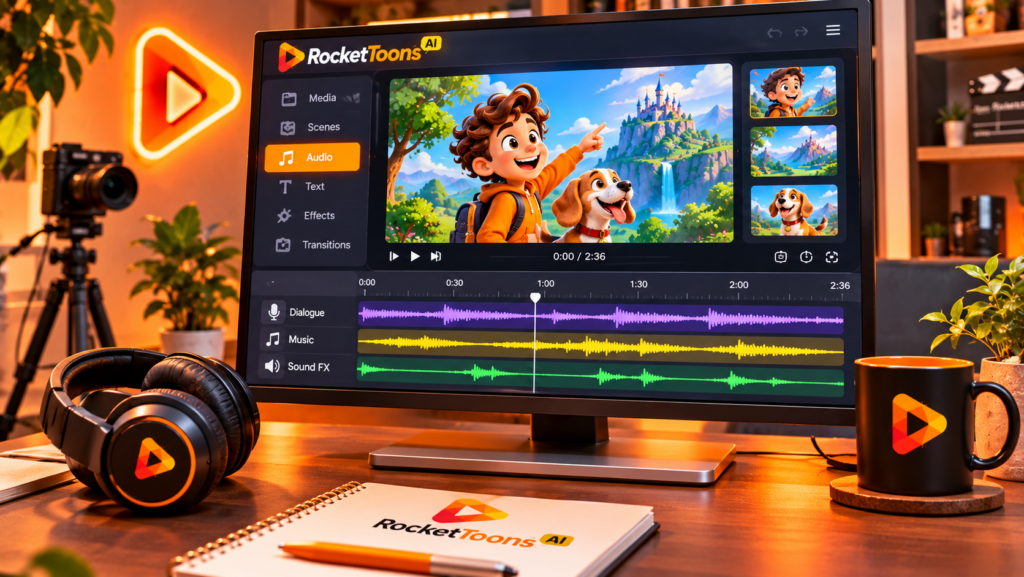
To add sound effects and background music to a cartoon video, start by identifying the mood and action in each scene, then choose audio that supports what viewers see on screen. Add sound effects to emphasize movements and events, use background music to establish atmosphere, and balance everything with character dialogue and narration. If you are creating animated videos with a tool such as RocketToons AI, audio is an important part of turning individual cartoon scenes into a more engaging finished video.
Imagine watching a cartoon character open a treasure chest without hearing the creak of the lid, the sparkle of the discovery, or the excitement in the music. The animation may still communicate the action, but the experience can feel less complete. Well-chosen audio helps viewers understand what is happening and feel more connected to the story.
What Are Sound Effects and Background Music in Cartoon Videos?
Sound effects are short audio elements that represent actions, movements, objects, or events. They help bring visual moments to life.
Examples include:
- Footsteps when a character walks.
- A door creaking when someone enters a room.
- A whoosh when an object moves quickly.
- A splash when a character jumps into water.
- A bell or chime when something surprising happens.
Background music is the musical track that plays behind the dialogue and action. It establishes the mood, supports the pacing, and helps create an emotional connection.
For example, a cheerful melody might suit a children’s cartoon, while gentle piano music may work better for a reflective story. Suspenseful music can help build anticipation before an important reveal.
Why Does Audio Matter in Animated Cartoon Videos?
Good audio makes animation feel more complete. It adds atmosphere, reinforces visual storytelling, and helps viewers understand the emotional direction of a scene.
Sound effects can draw attention to important actions. Background music can create excitement, humor, suspense, or calm. Dialogue and narration communicate the actual message.
When these elements work together, they create a more cohesive viewing experience.
Audio is particularly useful for:
- Children’s cartoons: Playful sounds and music can make simple actions more entertaining.
- Educational videos: Subtle audio cues can emphasize important information.
- Business explainers: Light background music can make presentations feel more polished.
- Animated stories: Music and effects can support emotional moments and changes in action.
- Social media cartoons: Carefully timed audio can help short scenes feel energetic and memorable.
How to Add Sound Effects and Background Music in 7 Steps
Step 1: Review Your Cartoon Video Scene by Scene
Before choosing audio, watch the animation without music or sound effects. Identify the important actions, dialogue, transitions, and emotional moments.
Make a simple audio plan for each scene. For example:
- Character enters: light footsteps.
- Character discovers something: short surprise sound.
- Character explains an idea: soft background music.
- Scene changes: subtle transition effect.
- Video ends: uplifting musical finish.
This prevents you from adding sounds randomly. Every audio element should have a reason to be there.
Step 2: Choose Background Music That Matches the Mood
Think about the emotion you want the audience to experience. The music should support the scene rather than compete with it.
Here are some useful combinations:
- Happy and playful: Light melodies, gentle percussion, and upbeat rhythms.
- Adventure: Energetic orchestral or cinematic music.
- Suspense: Subtle tension, atmospheric sounds, and gradual musical builds.
- Educational: Calm, unobtrusive instrumental music.
- Emotional: Gentle piano, soft strings, or atmospheric arrangements.
- Business and promotional: Modern, upbeat corporate or technology music.
Choose music that suits the entire video. If the mood changes significantly between scenes, you can use different sections or carefully selected tracks.
Step 3: Select Sound Effects for Important Actions
Sound effects should emphasize meaningful visual events. You do not need a separate sound for every movement.
For example, a cartoon character walking across a room may need subtle footsteps. A character jumping into a pool may need a splash. A magical transformation may benefit from a short shimmering effect.
Choose effects that fit the visual action and avoid using exaggerated sounds when a subtle effect would work better.
Step 4: Synchronize Audio With the Animation
Timing is essential. A sound effect should occur when the corresponding action happens, not several seconds before or after.
Pay attention to:
- Footsteps matching the character’s movement.
- Impact sounds matching the moment an object lands.
- Door sounds matching the opening or closing action.
- Musical changes matching important story moments.
- Transition sounds matching scene changes.
Even a good sound effect can feel distracting if it is poorly synchronized.
Step 5: Balance Music, Dialogue, and Sound Effects
This is one of the most important parts of audio editing. Background music should never make character dialogue difficult to understand.
Keep spoken dialogue and narration clear. Lower the music during important conversations, and bring it up slightly during pauses or visual sequences without speech.
Sound effects should also be controlled. A loud whoosh, explosion, or musical hit can overpower the voice if the levels are not balanced.
Listen to the complete video using headphones and ordinary speakers. Check that the dialogue remains understandable throughout.
Step 6: Use Audio Transitions and Fade Effects
Abrupt changes in music can make a cartoon video feel unfinished. Use fade-ins and fade-outs to introduce or end music smoothly.
When moving between scenes, consider whether the music should continue, change, or pause. A consistent soundtrack can help maintain continuity, while a deliberate change can emphasize a new location or emotional moment.
Keep transitions simple. Too many audio effects can distract viewers from the story.
Step 7: Preview the Entire Video Before Exporting
Watch the finished animation from beginning to end. Do not review only the individual scenes.
Check for:
- Music that starts or ends unexpectedly.
- Sound effects that occur at the wrong moment.
- Dialogue that is difficult to hear.
- Uncomfortable changes in audio volume.
- Long silent sections that feel unintended.
- Music that does not match the mood of the story.
Make the necessary adjustments and export the final video only after the complete audio experience feels consistent.
Where Can You Find Sound Effects and Background Music?
You can use built-in audio libraries or source music and sound effects from external providers. Some useful places to explore include:
- YouTube Audio Library: Music and sound effects for video creators. Check the individual track’s usage and attribution requirements.
- Pixabay Music and Sound Effects: A collection of audio resources with licensing terms that should be checked for each asset.
- Mixkit: Music and sound effects for creative projects. Review the applicable license before publishing.
Always confirm that the audio is licensed for your intended use. A track being free to download does not automatically mean it is cleared for every commercial project, advertisement, or client video.
How RocketToons AI Can Help With Cartoon Video Audio
RocketToons AI is advertised as an AI-powered cartoon video creation platform that brings together script assistance, character creation, scene development, voices, and video production.
Its promotional materials describe soundtrack options and scene-level controls that include sound effects and clip adjustments. These features may help creators develop the audio and visual elements of a cartoon within one production workflow.
For example, you could plan a short educational cartoon, create the scenes, add character dialogue, and use suitable sound and music options to support the lesson. You should still preview the result and check whether the audio fits the timing and mood of each scene.
Remember that an advertised audio feature does not remove the need for careful editing. Check the current platform interface and plan details to confirm which controls and audio options are available.
For a closer look at the advertised features, workflow, and buying considerations, read our complete RocketToons AI review.
Common Audio Mistakes to Avoid
- Playing music too loudly: Keep dialogue easy to understand.
- Adding too many sound effects: Use audio to emphasize important moments, not every movement.
- Choosing music that clashes with the story: Match the soundtrack to the mood and audience.
- Ignoring synchronization: Align effects with the actions viewers see.
- Using unlicensed audio: Check permissions before publishing or monetizing videos.
- Skipping the final audio review: Listen to the complete exported video before sharing it.
FAQs About Adding Audio to Cartoon Videos
Can I add sound effects to an AI-generated cartoon video?
Yes. You can use supported built-in audio tools or an external video editor to add sound effects that match the animated actions.
Should background music play throughout the entire cartoon video?
Not necessarily. Music can play throughout, but some scenes benefit from silence, natural sound effects, or reduced background audio. Choose what best supports the story.
How loud should background music be compared with dialogue?
There is no single setting that works for every video. The important thing is that dialogue remains clearly understandable. Lower the music whenever spoken content needs attention.
Can I use free music in monetized cartoon videos?
Sometimes. It depends on the specific license and permitted uses. Check whether commercial use and monetized video publishing are allowed, and follow any attribution requirements.
Do sound effects improve cartoon videos?
Well-chosen sound effects can make actions clearer, emphasize important moments, and create a more immersive experience. However, excessive or poorly timed effects can distract viewers.
Final Thoughts: Make Your Cartoon Videos Sound as Good as They Look
Sound effects and background music are not just finishing touches. They are important storytelling tools that help animated characters, scenes, and emotions connect with viewers. Start with a clear audio plan, choose music that fits the mood, synchronize effects with the action, and keep dialogue easy to understand.
Whether you are creating children’s stories, educational cartoons, business explainers, or social media videos, thoughtful audio editing can make the finished production feel more polished. If you want to explore an AI-assisted cartoon creation workflow with advertised voice and soundtrack options, take a closer look at RocketToons AI in our RocketToons AI review.