
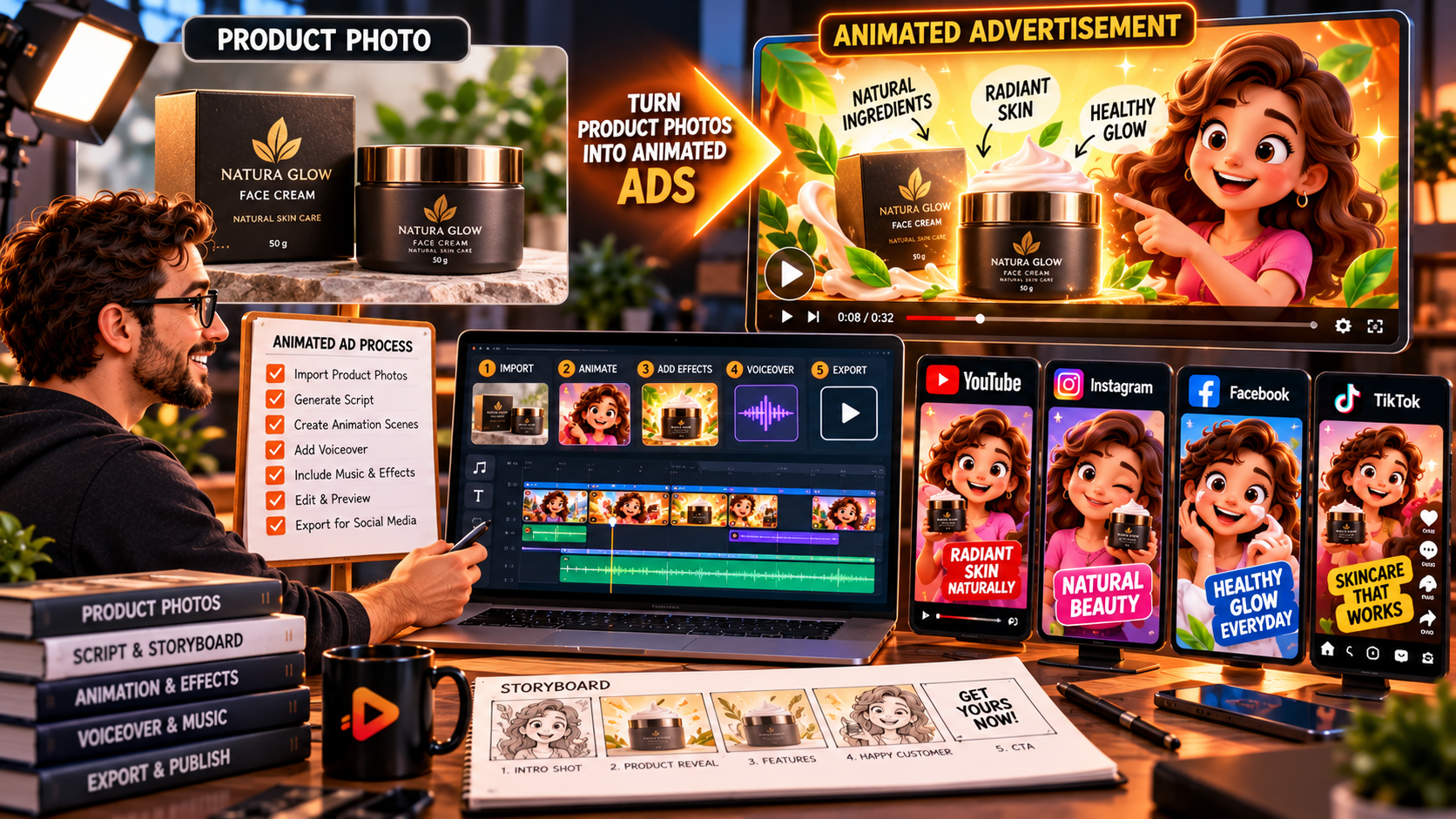
RocketToons Studio is an optional RocketToons AI upgrade designed to turn product photos, artwork and other images into short animated video clips and promotional ads. It can create clips from simple text prompts, animate product images, extend and chain clips, and provide camera-style options for more engaging visuals. If you want to explore its features and current offer, check out RocketToons AI and the Studio upgrade here.
For ecommerce sellers, affiliate marketers, small businesses and social media creators, static product images can sometimes struggle to capture attention. Animated visuals offer another way to demonstrate a product, highlight its features and create short promotional content. This review looks at what RocketToons Studio offers, how its workflow works and who may benefit from using it.
What Is RocketToons Studio?
RocketToons Studio is an optional upgrade within the RocketToons AI product ecosystem. While the main platform focuses on creating cartoon videos with AI-generated scripts, characters and scenes, Studio concentrates on producing short animated clips from prompts, photographs and other visual assets.
Its advertised features are particularly relevant to creators who want to make product animations, social media advertisements, short promotional clips, memes and visual cutaways without building a complete storyboard for every project.
RocketToons Studio Features: What Do You Get?
1. Turn Product Photos Into Animated Videos
One of the most interesting features is the ability to animate product photos. Instead of using only a static image in an advertisement, you can use Studio to create a short animated visual that gives the product a more dynamic presentation.
This could be useful for ecommerce product promotions, social media advertisements and short marketing videos. You can also animate artwork and portraits, giving creators more options than product photography alone.
2. Create Clips From Simple Text Prompts
Studio advertises the ability to generate short clips from a single sentence without requiring a complete storyboard. This can help when you have a visual idea but do not want to build an entire animated sequence manually.
For example, you could describe the type of product animation or visual effect you want, then use the generated result as a starting point for a promotional video.
3. Extend and Chain Animated Clips
A short animation may be useful as an individual social media post, but some projects need more than one clip. RocketToons Studio includes tools to extend and chain clips together.
This gives creators more flexibility when assembling a sequence of promotional visuals. You can develop multiple short shots and combine them into a more complete presentation.
4. Seven Camera Styles
The upgrade advertises seven camera styles to help vary the appearance of generated clips. Camera movement and framing can make a product presentation feel more dynamic than a static image.
Experiment with different styles to find an approach that suits the product. The aim should be to make the important product details easier to notice rather than adding movement simply for decoration.
5. Multiple Aspect Ratios and Clip Options
RocketToons Studio supports different aspect ratios, allowing creators to prepare visuals for different content placements. The advertised clip length is up to 15 seconds, making the upgrade particularly relevant to short-form promotional content.
You can also choose the AI model and clip length, save different takes and export the finished result as an MP4 file. These options provide flexibility when testing different versions of an advertisement.
How to Create Animated Product Video Ads With RocketToons Studio
The basic workflow can be approached in five steps:
- Choose your product image: Start with a clear photograph that shows the product properly. Use an image with enough detail for viewers to recognise what is being advertised.
- Decide on the animation concept: Think about whether you want a product showcase, a promotional visual, an animated presentation or a short social media clip.
- Enter your prompt and settings: Describe the desired result, select the available AI model and choose the clip length and aspect ratio.
- Generate and review the clip: Examine the animation to make sure the product remains recognisable and the visual result suits your intended advertisement.
- Save and export: Keep the preferred take, make any necessary adjustments and export the finished MP4 video.
Always inspect generated product animations carefully. Check that important product details, branding and proportions have not been distorted before using the clip in a paid advertisement.
Who Should Consider RocketToons Studio?
RocketToons Studio may be worth considering for several types of creators:
- Ecommerce sellers: Animate product photographs for promotional content and product showcases.
- Affiliate marketers: Create short visual clips to support product-focused content.
- Social media managers: Produce animated visuals for short-form content campaigns.
- Small business owners: Turn existing photographs and artwork into more engaging promotional material.
- Content creators: Generate memes, reactions, talking characters and visual cutaways.
The Studio upgrade is advertised at $37. It is an optional purchase, so consider whether its short-clip and image-animation capabilities match the type of content you plan to create. For a complete overview of the main platform, its pricing and other upgrades, read the full RocketToons AI review.
RocketToons Studio Pros and Considerations
Potential advantages:
- Animates product photos, artwork and portraits.
- Creates short clips from simple text prompts.
- Supports extending and chaining clips.
- Offers seven camera styles and multiple aspect ratios.
- Allows users to save takes and export MP4 videos.
Things to consider:
- The advertised maximum clip length is 15 seconds.
- Generated results should be reviewed before commercial use.
- Product details may need checking for visual accuracy.
- Studio is an optional upgrade rather than a requirement for using the core cartoon video features.
Frequently Asked Questions
Can RocketToons Studio turn product photos into videos?
Yes. Studio advertises image animation features that can turn product photographs into short animated clips for promotional and social media content.
Can I create video ads with RocketToons Studio?
Yes. Its image-animation and short-clip features can be used to create product promotions and advertising visuals. Review each result before publishing it as an advertisement.
How long can RocketToons Studio videos be?
The advertised maximum clip length is up to 15 seconds. Check the current upgrade details for any model-specific or usage conditions.
How much does RocketToons Studio cost?
The Studio upgrade is advertised at $37. Confirm the current price and included features on the order page before purchasing.
Final Verdict: Is RocketToons Studio Worth Considering?
RocketToons Studio is an interesting optional upgrade for creators who want to animate product photos, generate short promotional clips and produce additional visual content without building a full cartoon storyboard for every project.
Its text-prompt generation, image animation, clip extension, camera styles and MP4 export options make it particularly relevant to ecommerce sellers, marketers and social media creators. However, it is important to review the finished animations for accuracy and quality before using them commercially.
If short animated product videos fit your content strategy, RocketToons Studio may be worth exploring. To compare it with the core cartoon creation features and the other available upgrades, read the complete RocketToons AI review.