
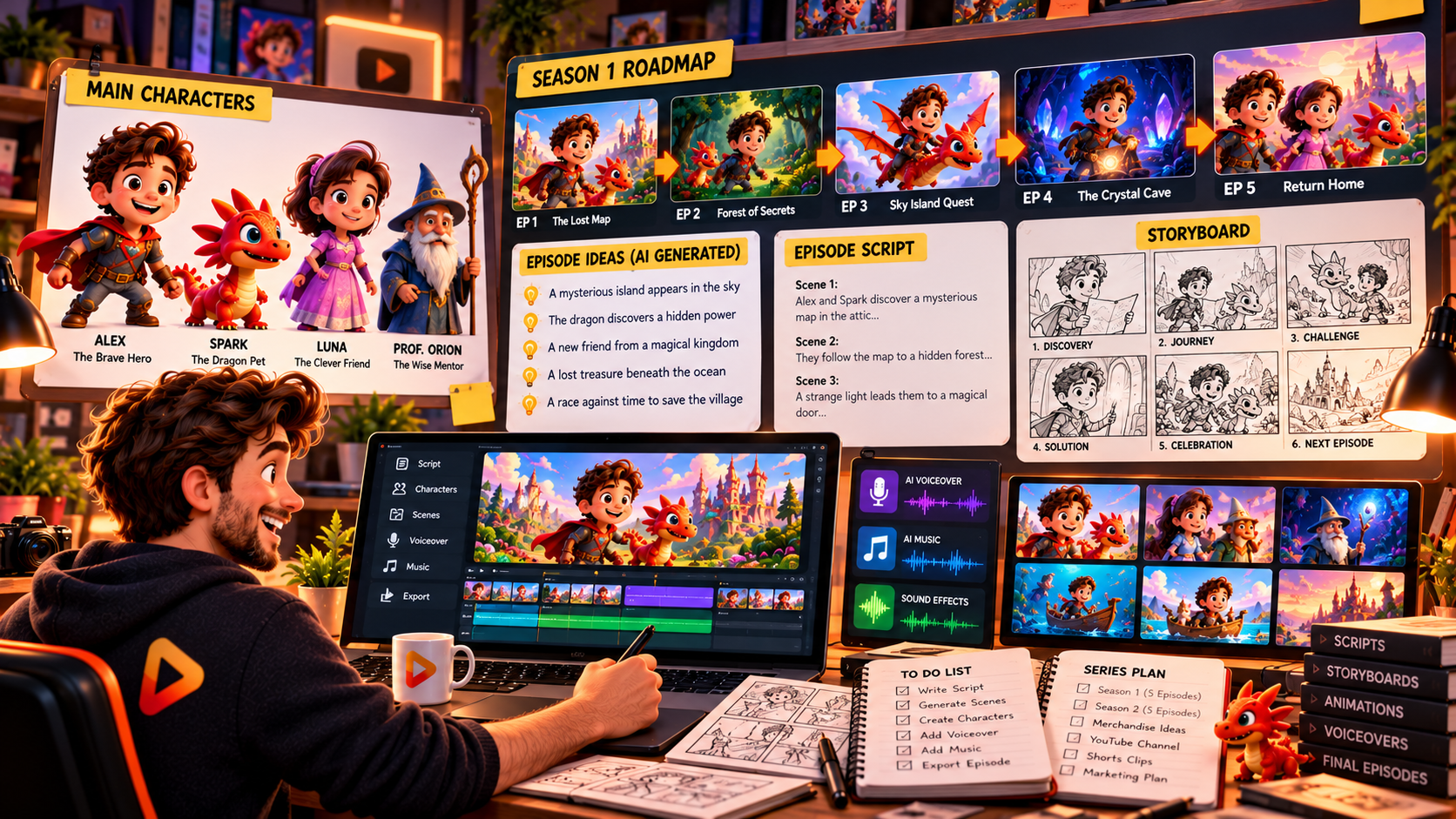
You can create an animated cartoon series with RocketToons AI by developing a story concept, creating recurring characters, generating scenes, adding character voices and music, and building each episode around the same cast. Its AI script writer, Consistent Character Engine, series planning tools and episode tracking are designed to help creators turn individual cartoon ideas into a connected series. If you want to explore this workflow, take a look at RocketToons AI here.
Instead of creating a completely new cartoon from scratch every time you publish, you can develop a familiar group of characters and continue their adventures across multiple episodes. This approach is useful for YouTube cartoon channels, children’s stories, educational animations and character-led entertainment.
What Makes a Good Animated Cartoon Series?
A successful cartoon series needs more than attractive animation. It needs a recognisable cast, a consistent visual style, an interesting setting and a story structure that gives viewers a reason to watch the next episode.
Before creating your first episode, establish four basic elements:
- Main characters: Decide who leads the story and which supporting characters appear regularly.
- Story universe: Establish the setting, relationships and general theme of the series.
- Visual identity: Choose an animation style and consistent character designs.
- Episode concept: Give every episode its own story while keeping it connected to the larger series.
Key takeaway: Recurring characters and a recognisable story world help turn separate cartoon videos into a coherent animated series.
How RocketToons AI Helps You Create a Cartoon Series
RocketToons AI brings several useful production tools into one environment. Its features are particularly relevant to creators who want to develop recurring characters and produce multiple related episodes.
1. AI Script Writer and Story Ideas
Every episode needs a story. RocketToons AI includes an AI script writer with 11 story formats, 88 ready-made ideas and 26 occasion presets.
You can use these resources to develop an initial concept, explore different story directions and create scripts around your chosen characters. You can also provide your own script if you already have an established storyline.
2. Consistent Character Engine
Character consistency is essential when producing a series. Viewers should recognise the same character whether they appear in the first episode or the tenth.
RocketToons AI includes a Consistent Character Engine designed to maintain character appearance across different poses, scenes, locations and stories. It also supports custom character uploads, making it useful if you already have a mascot or original cast.
3. Series and Episode Planning
One of the most relevant features for series creators is the ability to develop next-episode ideas and track episodes by character. This helps organise a continuing story rather than treating every video as an unrelated project.
Step-by-Step: How to Create an Animated Cartoon Series
Step 1: Choose Your Cartoon Niche
Decide what type of series you want to create. Possible directions include children’s adventures, educational cartoons, comedy, fantasy stories, animal characters or short motivational animations.
Choose a subject that gives you enough room to develop multiple episodes. A series about a group of animal friends solving everyday problems, for example, can generate many different story ideas without changing the central characters.
Step 2: Develop Your Main Characters
Create two or three memorable characters to begin with. Give each one a name, personality, visual identity and role in the story.
For example, your series might feature a curious young explorer, a funny robot sidekick and a wise mentor. Establish their appearance and personalities before developing the individual episodes.
Step 3: Build Your First Episode
Use RocketToons AI’s script-writing tools or provide your own story. Keep the first episode focused: introduce the characters, establish the setting and give the audience an interesting situation to follow.
A simple episode structure could be:
- Introduce the characters and their world.
- Present a problem, challenge or mystery.
- Show how the characters respond.
- Resolve the episode’s main conflict.
- Introduce a small idea that could lead into another episode.
Step 4: Generate Scenes and Review the Storyboard
Develop the scenes using your chosen characters and animation style. RocketToons AI provides storyboard still previews and a voiced animatic so you can review the story before proceeding with animation.
Check that the characters look consistent, the scenes follow the script and the dialogue makes sense. Its scene-level controls also allow adjustments to camera direction, character action, sound effects and clip length.
Step 5: Add Voices, Music and Finishing Touches
The front-end package includes 40 natural AI voices and support for 25 languages. Assign voices to your characters so viewers can recognise the different speakers throughout the series.
You can also use the available music tracks, transitions, zoom and pan effects, and caption styles to give each episode a more complete presentation.
Step 6: Plan and Produce the Next Episode
Once your first episode is ready, use the series workflow to explore next-episode ideas and track episodes by character. Keep the same cast and visual identity while introducing new situations, locations and storylines.
For YouTube, you can prepare widescreen 16:9 videos or create vertical 9:16 versions for Shorts. The platform also supports square 1:1 exports.
Tips for Building a Cartoon Series People Want to Follow
- Keep characters recognisable: Maintain their defining appearance, clothing and personality.
- Give every episode a clear story: Avoid making episodes feel like random collections of scenes.
- Use recurring themes: Familiar settings and relationships help establish a recognisable series identity.
- Maintain a publishing routine: Plan episodes ahead instead of deciding on a new concept every time.
- Review every finished video: Check dialogue, scene continuity, audio and visual quality before publishing.
- Add your own creative direction: AI tools can assist production, but original storytelling and meaningful editing give your series its identity.
If you want to understand the complete platform, including its animation features, commercial license, pricing and optional upgrades, explore the complete RocketToons AI review and buying guide.
Frequently Asked Questions
Can RocketToons AI create multiple cartoon episodes?
RocketToons AI includes series-related features such as next-episode ideas and episode tracking by character. These are designed to support the development of multiple related cartoon episodes.
Can I use the same characters throughout my cartoon series?
Yes. Its Consistent Character Engine is designed to maintain character appearance across scenes and stories. You can also upload your own characters.
Can RocketToons AI write cartoon episode scripts?
Yes. Its AI script writer includes 11 story formats, 88 ready-made ideas and 26 occasion presets to help develop cartoon story concepts.
Can I create cartoon videos for YouTube?
Yes. RocketToons AI supports 16:9 widescreen exports for standard YouTube videos, along with 9:16 vertical and 1:1 square formats for other content placements.
Do I need animation experience to create a cartoon series?
The platform is designed to help creators produce animated videos without manually drawing and animating every scene. You provide the creative direction and use its AI-assisted tools to develop the characters, scenes, voices and finished videos.
Final Thoughts: Build Your Own Animated Cartoon Series
Creating an animated cartoon series becomes more manageable when you establish a recurring cast, develop a clear story universe and follow a repeatable episode-production workflow. RocketToons AI supports this approach with AI script writing, character consistency tools, scene previews and episode planning features.
It is particularly worth considering if you want to build a YouTube cartoon channel, produce recurring educational animations or develop a character-led content brand. For the complete picture of its features, pricing, upgrades and commercial options, read the full RocketToons AI review and feature breakdown.