
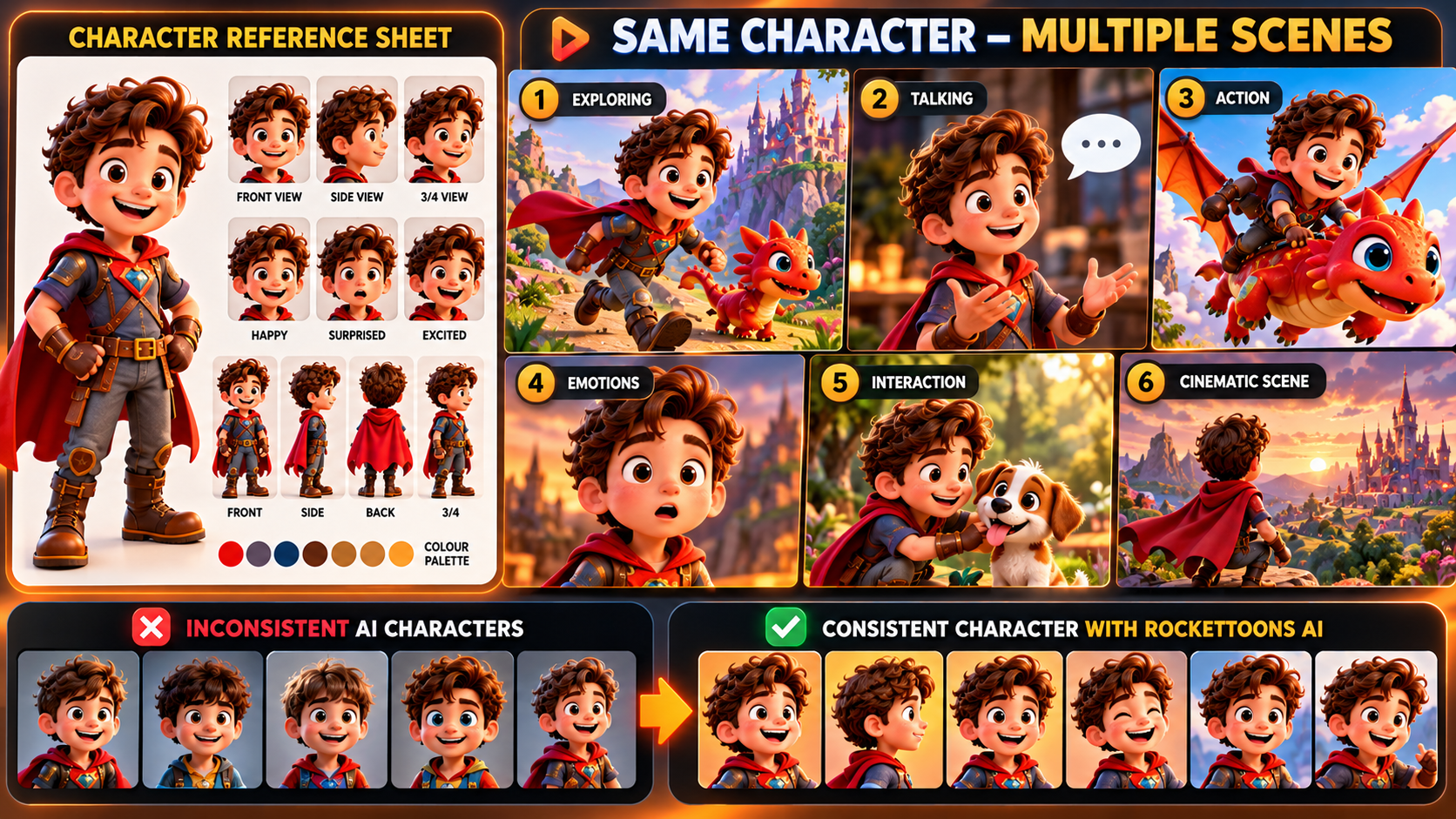
To keep cartoon characters looking the same in every scene, use consistent character references, maintain the same visual descriptions, and review each scene before final animation. RocketToons AI is designed to make this process easier with its Consistent Character Engine, custom character uploads and scene-level editing controls. These tools help creators develop recurring characters for cartoon stories, YouTube episodes and animated video series. Explore RocketToons AI and its character creation features.
Character consistency is one of the biggest challenges in AI cartoon production. A character may look perfect in the opening scene, but changes in facial features, clothing, colours or proportions can make later scenes feel disconnected. Here’s how to approach this problem and use RocketToons AI’s workflow to create a more recognisable cast.
Why Is Character Consistency Important in AI Cartoon Videos?
Character consistency means that the same animated character retains recognisable visual features throughout a video or series. Their face, hairstyle, clothing, colours, body proportions and other defining details should remain recognisable even when their pose, expression, camera angle or location changes.
Imagine creating a cartoon series about a young explorer wearing a red jacket and a blue backpack. If the jacket changes colour, the hairstyle becomes different or the character’s face changes between scenes, viewers may feel that they are watching different characters.
This matters particularly for:
- YouTube cartoon channels: Viewers should recognise recurring characters from one episode to another.
- Children’s animation: Familiar characters help make stories easier to follow.
- Educational cartoons: A consistent presenter or mascot creates continuity between lessons.
- Brand explainers: A business mascot should look recognisable throughout the promotional video.
- Animated series: A recurring cast needs a coherent visual identity across episodes.
Key takeaway: Consistent character design helps an animated video feel like one connected production rather than a collection of unrelated AI-generated scenes.
How Does RocketToons AI Help Maintain Character Consistency?
RocketToons AI includes a feature called the Consistent Character Engine, designed to keep characters looking like themselves across different poses, scenes, locations and stories.
This is particularly useful when you want to build a recurring cast. Rather than approaching every scene as a completely new character-generation task, the platform is designed around reusing characters throughout your cartoon projects.
There are several supporting tools and workflow elements that make this useful:
- Character creation: Develop characters for your cartoon projects.
- Custom character uploads: Bring your own character designs into the workflow.
- Character mentions: Use @-mentions to identify characters in individual shots.
- Scene previews: Review storyboard stills and a voiced animatic before proceeding with animation.
- Shot-level controls: Adjust camera direction, character action, sound effects and clip length.
- Saved takes: Keep the last six takes for each shot so you can return to an earlier version when needed.
These features are relevant because character consistency is not just about generating a good-looking character once. It is about carrying that character through the complete story.
How to Keep Cartoon Characters Consistent in Every Scene
Step 1: Establish a Clear Character Design
Start by defining the character before building the story. Give the character a clear visual identity with details that should remain recognisable throughout the video.
For example:
- Name: Max
- Age appearance: Young adult
- Hair: Short, dark brown hair
- Clothing: Red jacket, white T-shirt and dark trousers
- Accessories: Blue backpack
- Defining feature: Small scar above the left eyebrow
- Personality: Curious, friendly and adventurous
These details create a simple character reference. Keep the defining features consistent whenever you describe or use Max in a new scene.
Step 2: Create or Upload Your Character
Use RocketToons AI’s character creation tools to establish the character for your project. If you already have a character design, the platform also supports uploading your own characters.
This is especially useful if you are building a channel around an original mascot or want to use an existing character identity across multiple videos.
Step 3: Choose One Animation Style
Visual consistency also depends on the animation style. RocketToons AI offers eight styles in its front-end package:
- Pixar 3D
- Classic 2D
- Preschool 2D
- Storybook
- Ghibli
- Action Anime
- Comic Book
- Claymation
Choose the style that suits your story and keep the same visual direction throughout the project. Avoid switching between unrelated styles in the middle of an episode unless the change is intentional.
Step 4: Identify Characters in Individual Scenes
When developing individual shots, make sure the intended characters are clearly identified. RocketToons AI supports character @-mentions, which help specify which character should appear in a particular shot.
For example, if Max and a friendly robot appear together in a garden scene, identify both characters rather than relying on a vague description such as “two friends talking.” Clear character references help keep the scene direction organised.
Step 5: Preview the Story Before Final Animation
One of the most useful parts of the RocketToons workflow is the ability to review storyboard stills and a voiced animatic before proceeding with animation.
Use the preview stage to check:
- Does the character still have the same hairstyle and clothing?
- Are the face and body proportions recognisable?
- Are the character’s colours consistent?
- Does the character appear in the correct scene?
- Do the poses and expressions suit the dialogue?
Identifying inconsistencies at this stage gives you an opportunity to adjust the scene direction before moving forward.
Step 6: Refine Individual Shots Instead of Rebuilding Everything
RocketToons AI includes controls for adjusting camera direction, action, sound effects and clip length. It also allows you to correct an individual dialogue line without redoing the entire scene.
The platform keeps the last six takes for each shot, which gives you the option to return to an earlier version if a new adjustment does not work as expected.
This scene-level approach is useful when most of a cartoon is working well but one particular shot needs attention.
Common Character Consistency Mistakes to Avoid
| Common mistake | How to avoid it |
|---|---|
| Changing character descriptions between scenes | Maintain a fixed character reference with defining visual details. |
| Switching animation styles | Choose one visual style and maintain it throughout the project. |
| Changing clothing and accessories unintentionally | Keep clothing colours and distinctive accessories consistent. |
| Skipping scene previews | Review storyboard stills and the voiced animatic before final animation. |
| Rebuilding an entire scene for a small problem | Use individual shot and dialogue controls where appropriate. |
| Creating a new character for every episode | Reuse your established characters when developing a recurring series. |
Can You Use Consistent Characters to Build a YouTube Cartoon Series?
Yes. Consistent characters are particularly valuable when developing a recurring cartoon series. Instead of introducing a completely different cast in every upload, you can build a familiar group of characters and create new stories around them.
For example, a channel could feature:
- A recurring main character who leads each story.
- A sidekick who adds humour or helps solve problems.
- A mentor character who introduces new lessons.
- A recurring setting that connects different episodes.
RocketToons AI includes series-related features such as AI-generated next-episode ideas and episode tracking by character. Combined with its character workflow, these tools are relevant to creators planning a sequence of related animated videos.
For a broader look at the platform’s complete feature set, commercial package and available upgrades, read the full RocketToons AI review and feature breakdown.
Frequently Asked Questions
What is character consistency in AI animation?
Character consistency means maintaining the same recognisable visual identity across different scenes and episodes. Important details include facial features, hairstyle, clothing, colours, body proportions and accessories.
Does RocketToons AI have a character consistency feature?
Yes. RocketToons AI includes a Consistent Character Engine designed to maintain character appearance across different poses, scenes, locations and stories.
Can I upload my own cartoon characters to RocketToons AI?
Yes. RocketToons AI supports uploading your own characters, allowing you to bring existing character designs into your cartoon projects.
How can I prevent characters from changing appearance between scenes?
Establish a clear character reference, maintain the same defining visual descriptions, use the character identification tools and review storyboard previews before proceeding with animation.
Can I reuse the same characters in multiple cartoon episodes?
RocketToons AI is designed to support recurring characters and series creation. Its series workflow includes next-episode ideas and episode tracking by character.
Final Thoughts: Create More Consistent AI Cartoon Characters
Keeping cartoon characters consistent requires more than generating an attractive character in the opening scene. You need a recognisable design, clear character references, a consistent visual style and a workflow that lets you review and refine individual scenes.
RocketToons AI brings these requirements together through its Consistent Character Engine, character uploads, @-mention controls, storyboard previews and scene-level editing tools. These features make it worth considering if you want to create recurring cartoon characters for YouTube videos, educational content, branded animations or a continuing cartoon series.
If you want to see how these character tools fit into the wider platform, including its animation styles, AI voices, pricing and commercial options, explore the complete RocketToons AI review and buying guide.