
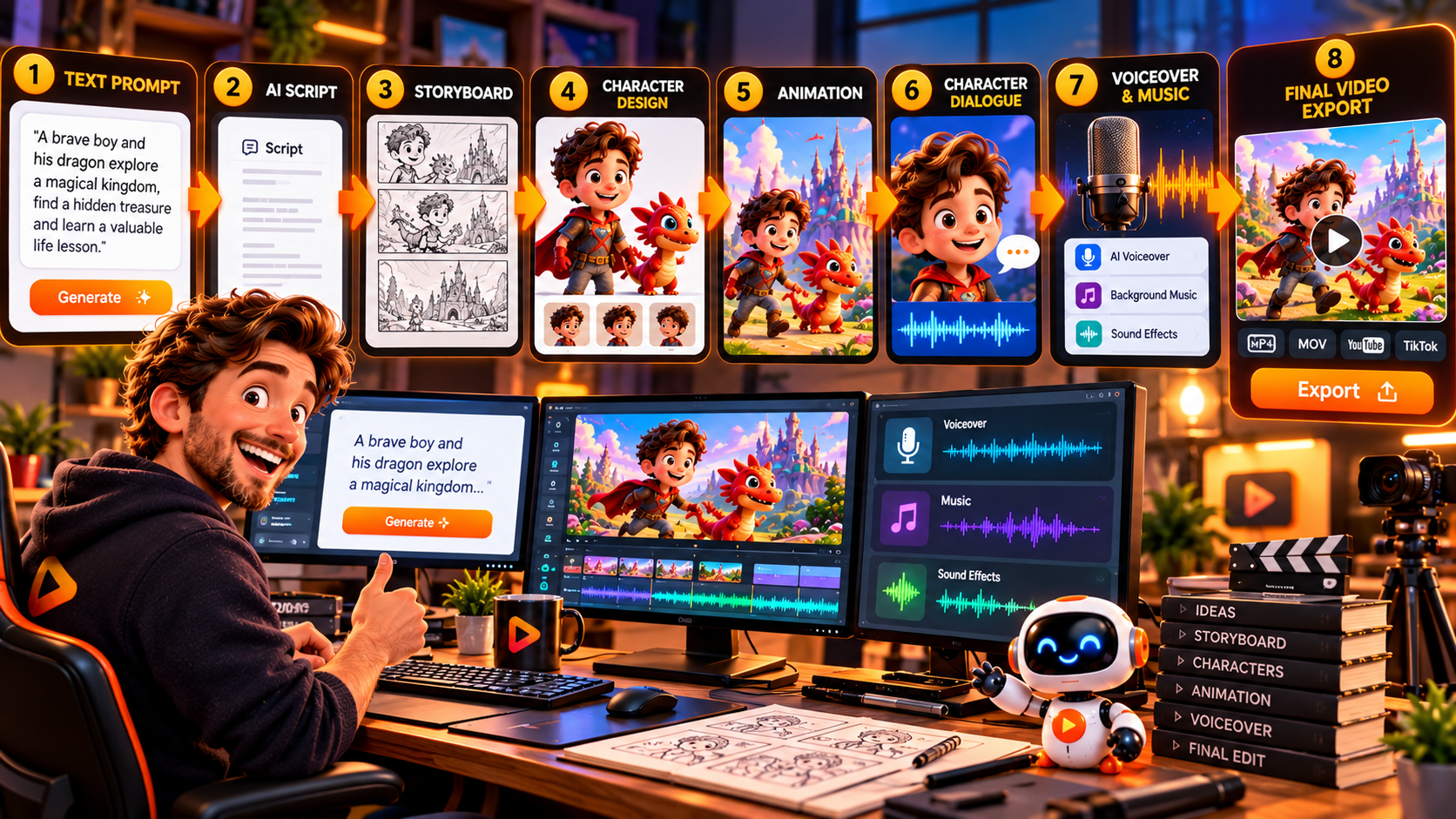
RocketToons AI turns one idea into a cartoon video by helping you develop the script, create characters and scenes, add AI voices and music, and assemble everything into an animated production. You can start with a simple concept or an existing script and use its AI-assisted workflow to create a cartoon without manually drawing and animating every scene. Explore RocketToons AI here.
The process takes you from an initial idea to a video you can review, refine and export. Here’s how the workflow works, what to prepare before starting, and how to get better results from your first cartoon project.
How Does RocketToons AI Turn an Idea Into a Cartoon Video?
RocketToons AI combines several stages of cartoon production in one workflow: story development, character creation, scene generation, voice assignment, music and video export.
Imagine creating a short cartoon about a curious puppy learning to share. You can start with that basic idea, develop it into a story, create the puppy and supporting characters, build the scenes, assign dialogue voices and prepare the finished animation.
Step-by-Step: Create a Cartoon Video With RocketToons AI
Step 1: Start With a Clear Video Idea
Begin with one simple concept. You don’t need a lengthy script at this stage. A useful starting prompt identifies the main character, the situation and what happens in the story.
For example: A curious puppy discovers a lost toy in the garden and learns why sharing makes playtime better.
This gives the AI a clear direction. Avoid combining several unrelated story ideas in one prompt. Decide what the viewer should understand or feel by the end of the video.
Step 2: Develop Your Script and Story
RocketToons AI includes an AI script writer with 11 story formats, 88 ready-made ideas and 26 occasion presets. You can use these resources to develop a starting concept or bring your own script into the workflow.
A simple story structure works well:
- Opening: Introduce the character and setting.
- Problem: Give the character something to solve or discover.
- Development: Show the character responding to the situation.
- Resolution: Bring the story to a satisfying conclusion.
A clear sequence helps the resulting cartoon feel like a connected story rather than a collection of unrelated scenes.
Step 3: Create Your Characters and Choose a Visual Style
Next, establish the characters that will appear in your cartoon. RocketToons AI provides character creation tools and supports uploading your own characters. Its Consistent Character Engine is designed to maintain a recognisable appearance across different scenes and stories.
You can select from eight front-end animation styles:
- Pixar 3D
- Classic 2D
- Preschool 2D
- Storybook
- Ghibli
- Action Anime
- Comic Book
- Claymation
Choose a visual direction that suits your intended audience. A colourful, friendly style may work well for a children’s story, while an action-themed cartoon may need a different treatment.
Step 4: Generate and Review Your Scenes
Once your story and characters are established, move into scene development. RocketToons AI provides storyboard still previews and a voiced animatic so you can review the sequence before proceeding with the animated output.
Check whether the characters, locations and story progression make sense. Look for changes in character appearance, confusing transitions or dialogue that doesn’t fit the action. Reviewing early is more practical than waiting until the entire video is complete.
Step 5: Add Character Voices and Music
RocketToons AI includes 40 natural AI voices and supports 25 languages. You can assign voices to characters, making it possible to create dialogue-driven cartoons without recording every line yourself.
The front-end package also includes music tracks, transitions, zoom and pan effects, and word-by-word caption styles. Select audio that supports the mood of the story rather than overwhelming the dialogue.
Step 6: Refine the Animation and Export
Before exporting, review the scenes and make any necessary adjustments. RocketToons AI includes scene-level controls for camera direction, character action, sound effects and clip length. It also allows you to correct an individual dialogue line without rebuilding the entire scene and keeps the last six takes for each shot.
When the video is ready, choose the appropriate format:
- 16:9: Standard widescreen YouTube videos.
- 9:16: Vertical videos for Shorts and Reels.
- 1:1: Square social media content.
Watch the Official RocketToons AI Walkthrough
Want to see the product workflow in action? The official walkthrough is a useful way to understand the cartoon creation process and see how the different creative elements fit together.
Ready to explore the idea-to-cartoon workflow?
Tips for Getting Better Results From Your Cartoon Video
- Keep the first project simple. Start with a short story and a small cast before attempting a complex episode.
- Describe characters clearly. Give each character distinctive visual details and a consistent role.
- Use one visual style throughout. A consistent look helps the video feel like a unified production.
- Preview before final animation. Use the storyboard and animatic stages to identify problems early.
- Check dialogue and timing. Make sure voices, actions and scene lengths work together.
- Choose the export format before publishing. Match the aspect ratio to the platform and viewing experience you are targeting.
Frequently Asked Questions
Can I create a cartoon video from just one idea?
Yes. RocketToons AI is designed to let you start with a simple idea or written script and develop it into an animated video using its story, character, scene, voice and music tools.
Do I need to write the entire cartoon script myself?
No. The platform includes an AI script writer, story formats, ready-made ideas and occasion presets. You can use these to develop a story or provide your own script.
Can I use the same characters in multiple cartoon videos?
RocketToons AI includes character tools and a Consistent Character Engine designed to help maintain character appearance across scenes and stories. Its series features also support recurring characters and episode planning.
Can I make vertical cartoon videos for YouTube Shorts?
Yes. The platform supports 9:16 vertical exports, as well as 16:9 widescreen and 1:1 square formats.
Final Thoughts
RocketToons AI provides a structured way to turn a simple concept into a cartoon video: develop the story, create the characters, generate scenes, add voices and music, review the result and export it for your chosen platform.
The most practical approach is to begin with a short, focused story and refine it through the preview and editing stages. Once you are comfortable with the workflow, you can explore recurring characters, longer stories and different content formats.
If you want to understand how the workflow fits into the product’s wider features, pricing, upgrades and commercial options, read our complete RocketToons AI review and buying guide.
It will help you decide whether RocketToons AI is the right fit for the animated content you want to create.
Read the full RocketToons AI review, features and pricing breakdown.