
AI Video Creation · Feature Breakdown
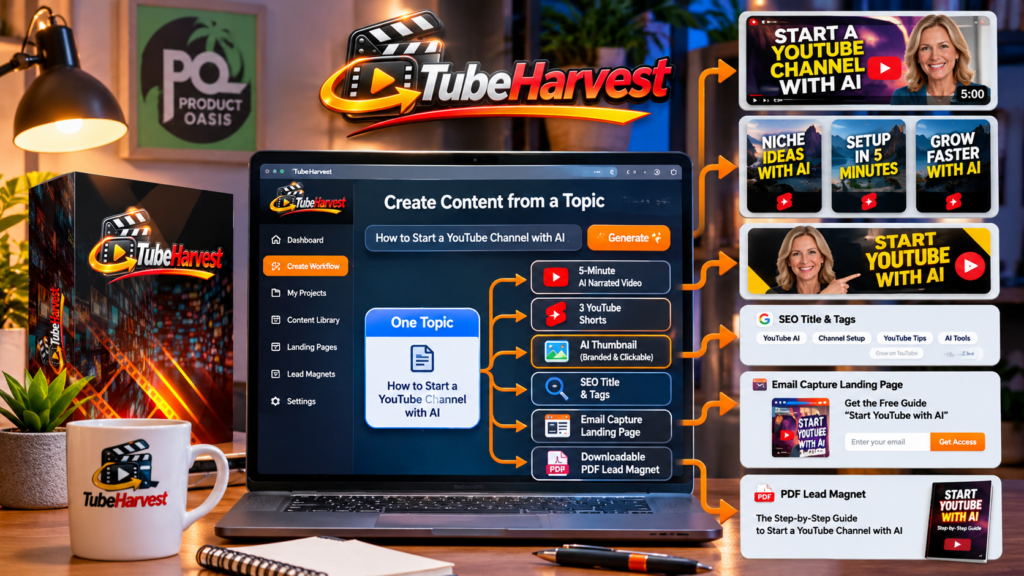
TubeHarvest turns a single topic into a complete YouTube marketing package, including a faceless video with AI narration, three YouTube Shorts, a thumbnail, SEO titles, descriptions, tags, social media captions, an email capture landing page and a matching PDF lead magnet. Its defining advantage is combining video production, content repurposing and email list building within one cloud-based application.
What Are the Key Features of TubeHarvest?
TubeHarvest addresses a common challenge for YouTube creators: producing enough useful content while managing the different assets needed for publishing and audience growth.
AI Video Creation
Generate topic-based faceless videos with scripts, AI narration, relevant visuals and captions, without filming yourself.
Automatic YouTube Shorts
Repurpose moments from your main video into three vertical Shorts with the Commercial edition.
AI Thumbnail Generator
Receive a topic-specific thumbnail with each video package, reducing separate graphic design work.
YouTube SEO Assets
Generate relevant titles, descriptions, tags and social media captions to support your publishing process.
Email Capture Landing Page
Give interested viewers a dedicated destination where they can subscribe to receive a relevant resource.
Automatic PDF Lead Magnet
Offer a downloadable guide connected to your video’s subject, providing a meaningful incentive for subscribers.
How Does TubeHarvest Turn One Topic Into Videos, Shorts and Leads?
The TubeHarvest workflow connects content production with lead generation through four straightforward stages.
Enter your topic
Choose a question, problem or subject that interests your target audience.
Generate your content package
TubeHarvest assembles the main video, short-form clips, thumbnail and publishing materials.
Review and publish
Check your generated assets, refine them where necessary and publish your videos.
Invite viewers to subscribe
Promote your matching landing page and PDF guide through your long-form video description.
The TubeHarvest advantage
One topic. Multiple content assets. A dedicated opportunity to turn viewers into email subscribers.
TubeHarvest vs. Traditional Video Production
Instead of assembling every marketing asset separately, TubeHarvest brings the main production tasks together.
| Task | Traditional Method | TubeHarvest |
|---|---|---|
| Script and narration | Prepared separately | AI-generated |
| Video production | Manual assembly | Integrated workflow |
| Shorts and thumbnail | Additional projects | Package assets |
| SEO content | Written separately | Generated metadata |
| Lead generation assets | Separate setup | Matching page and PDF |
Want to see the complete offer?
Explore the pricing, demonstrations, upgrades and exclusive bonus details.
Practical Example: Turning a Topic Into a Marketing Funnel
Imagine you run a YouTube channel about productivity and choose the topic How to Plan Your Week Effectively.
Here is how you could use the generated assets together:
Explain a practical weekly planning method.
Highlight individual planning tips.
Communicate the video’s topic and practical benefit.
Offer a downloadable weekly planning guide in exchange for an email signup.
This approach gives each asset a clear purpose. The videos attract attention, while the downloadable resource provides an opportunity to establish an ongoing relationship with interested viewers.
How Much Content Can TubeHarvest Create Each Month?
TubeHarvest Commercial provides 10 monthly content packages, with main videos running up to five minutes each. Using the full allowance could produce:
That represents up to 40 individual videos, alongside the associated landing pages, thumbnails and publishing materials. Premiere offers expanded capacity, longer videos and additional Shorts per package.
Frequently Asked Questions About TubeHarvest Features
What does one TubeHarvest credit generate?
One credit generates a complete content package containing a main video, Shorts, thumbnail, SEO materials, landing page and PDF lead magnet.
Do I need to install TubeHarvest?
No. TubeHarvest is a cloud-based application accessible through your web browser.
Does TubeHarvest generate lead magnets automatically?
Yes. It creates a PDF guide related to your selected topic, together with a matching email capture page.
Can I use TubeHarvest to create videos for clients?
Yes. TubeHarvest Commercial includes a commercial license for producing video packages for clients.
Final Takeaway: What Makes TubeHarvest Worth Considering?
TubeHarvest stands out because it connects faceless video creation with content repurposing and lead generation. Rather than concentrating exclusively on producing videos, it equips creators with supporting marketing assets built around the same topic.
For YouTubers, affiliate marketers, entrepreneurs and video service providers, this integrated approach makes TubeHarvest a compelling choice for establishing a repeatable content production system.
Discover the Complete Package
Ready to Explore Everything TubeHarvest Offers?
Get the complete breakdown of pricing, features, official demonstrations, upgrades and exclusive bonuses before choosing your package.