
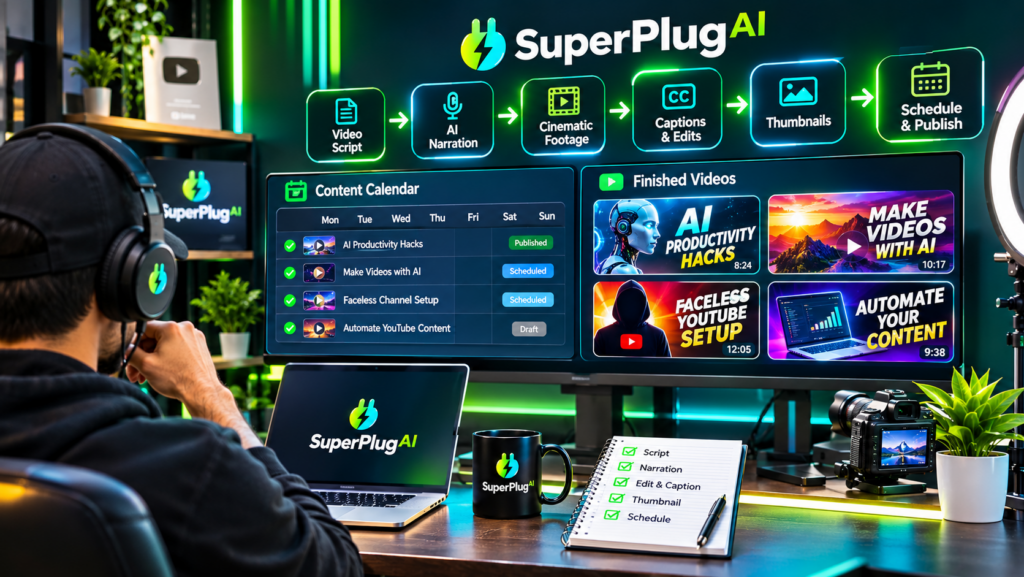
You can automate faceless YouTube video production and content creation with SuperPlug AI by connecting its supported AI tools, describing your video requirements, reviewing the proposed production plan and approving the workflow. SuperPlug AI can help create video scripts, generate video assets, produce voiceovers, design thumbnails, repurpose long-form content into Shorts and support content scheduling through available integrations. Explore SuperPlug AI and its faceless content creation capabilities.
For creators who want to build a YouTube channel without appearing on camera, this approach can bring several production tasks into one AI-assisted workflow. Here’s how to use SuperPlug AI to plan, create and organise faceless YouTube content.
What Is Faceless YouTube Automation with SuperPlug AI?
Faceless YouTube automation means producing videos without recording yourself on camera. Instead, videos can use scripts, stock footage, AI-generated visuals, voiceovers, animations, graphics and other supporting media.
SuperPlug AI is designed to connect AI assistants such as ChatGPT, Claude and Grok with creative production tools through MCP. Its video-related workflows include script creation, video production, voiceovers, thumbnails, Shorts and content repurposing.
The important distinction is that SuperPlug AI helps coordinate and produce creative assets. You still need to choose a niche, check factual accuracy, review the finished videos and make publishing decisions.
Step 1: Choose a YouTube Niche and Video Format
Start by selecting a niche that has a clear audience and enough topics to support consistent publishing. Examples of faceless YouTube channel categories include:
- AI tools and software tutorials.
- Personal finance education.
- Business and entrepreneurship explainers.
- Travel facts and destination guides.
- History and educational storytelling.
- Product comparisons and software demonstrations.
Decide whether your channel will focus on long-form videos, YouTube Shorts or a combination of both. A consistent format makes it easier to develop repeatable production workflows.
Step 2: Connect SuperPlug AI to Your AI Assistant
SuperPlug AI uses Model Context Protocol (MCP) to connect supported AI assistants with its creative tools.
- Sign in to your SuperPlug AI account.
- Locate your personal MCP connection instructions.
- Copy the connection details provided for your account.
- Add the connection through the supported settings in ChatGPT, Claude or Grok.
- Complete the authentication process and enable the connector.
Once connected, you can describe your content requirements in a normal conversation and request supported production workflows. The available tools depend on your account and the integrations you have enabled.
Step 3: Generate a Faceless YouTube Video Script
A good faceless video begins with a well-structured script. Ask your connected assistant to create a script for a specific audience, topic and video length.
For example, you could use this prompt:
Create a seven-minute faceless YouTube video script titled “5 AI Tools That Can Save Small Businesses Time.” Start with a compelling hook, explain each tool in a clear and engaging way, include practical examples, suggest suitable visuals for every section and finish with a natural call to action. Format the script for AI voiceover narration.
Review the script before production. Check facts, remove repetitive sections and make sure the content delivers genuine value rather than simply filling video time.
Step 4: Create Video Scenes, Visuals and Voiceovers
After finalising the script, move into the creative production stage. SuperPlug AI’s video workflows are designed to support different types of content, including explainers, product demonstrations, commercials, UGC-style videos and faceless YouTube assets.
Depending on the workflow and connected services available, you can request:
- Video scenes: Visual sequences that illustrate the narration.
- Stock or AI visuals: Supporting footage and generated creative assets.
- Voiceovers: Narration to accompany the video.
- Background music: Audio that complements the subject and tone.
- Graphics: Titles, labels and supporting visual elements.
Review the proposed production plan, estimated time and credit requirements before approving the task. Check the final video for visual consistency, narration quality, pacing and factual accuracy.
Step 5: Create YouTube Thumbnails and Repurpose Content
Your video is only one part of a complete YouTube publishing workflow. SuperPlug AI also highlights thumbnail creation and content repurposing capabilities.
You can use its creative workflows to develop thumbnail concepts with clear visual subjects, readable text and a strong curiosity angle. For example, a video about AI tools might use a simple before-and-after visual with a short phrase that communicates the benefit.
You can also explore workflows for turning longer videos into shorter clips. Repurposing one long-form video into multiple Shorts can help you create additional content from the same core topic.
Step 6: Organise and Schedule Your YouTube Content
Consistency matters when building a YouTube channel. Plan a realistic publishing calendar rather than generating videos without a clear strategy.
SuperPlug AI’s launch materials describe content scheduling and social publishing workflows through supported integrations. Depending on the connected services and permissions available, you can organise content, prepare campaign assets and schedule supported posts.
Before publishing, check titles, descriptions, thumbnails, captions, copyright permissions and any claims made in the video. AI-generated content should always receive human review.
For a broader explanation of the platform’s video engine, integrations, pricing and available upgrades, read the complete SuperPlug AI review and feature breakdown.
Tips for Building a Better Faceless YouTube Channel
- Choose a focused niche: Make it clear who your channel serves and what viewers can expect.
- Prioritise useful scripts: Original explanations and practical examples make videos more valuable.
- Use consistent branding: Maintain recognisable colours, fonts and thumbnail styles.
- Make the opening engaging: Give viewers a clear reason to keep watching.
- Review every video: Check narration, visuals, accuracy and licensing before publication.
- Study audience response: Use viewer retention and engagement data to improve future content.
Frequently Asked Questions
Can SuperPlug AI create faceless YouTube videos?
Yes. Its listed video workflows include faceless YouTube assets, scripts, video production, voiceovers and thumbnails. The exact output depends on the workflow and connected tools available to your account.
Can SuperPlug AI turn long videos into YouTube Shorts?
SuperPlug AI’s launch materials describe workflows for repurposing longer videos into shorter clips. Availability and output depend on the supported workflow.
Do I need to appear on camera?
No. A faceless channel can use narration, stock footage, AI-generated visuals, graphics and other supporting media instead of an on-camera presenter.
Can I automate YouTube publishing?
SuperPlug AI describes scheduling and social publishing capabilities through supported integrations. The exact publishing options depend on the connected platform, account permissions and available workflow.
Final Thoughts
SuperPlug AI can help simplify faceless YouTube production by bringing scriptwriting, video creation, voiceovers, thumbnails, content repurposing and supported scheduling workflows into one AI-assisted environment. Start with a focused niche, create a useful script, review the production plan and build a repeatable publishing process.
If you want to explore the complete feature set, pricing, integrations and available upgrades before getting started, read the full SuperPlug AI review.