
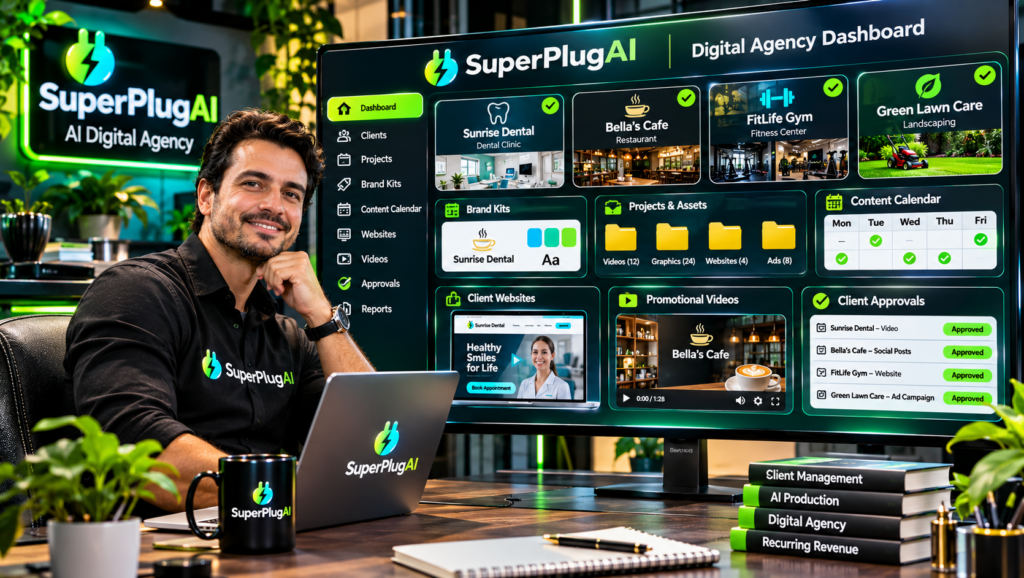
You can start an AI content agency with SuperPlug AI by using its creative production tools to create videos, graphics, websites, voiceovers and marketing assets for paying clients. The Premium plan advertises a commercial license, allowing you to create content for clients and charge for your work. If you want dedicated client-management features, the optional Agency upgrade adds tools such as client dashboards, separate brand kits, project libraries and approval links. Explore SuperPlug AI and its commercial agency capabilities.
This guide explains how to build an AI content service business around SuperPlug AI, choose services to offer, manage client projects and understand the role of its commercial license and Agency upgrade.
What Is an AI Content Agency?
An AI content agency provides businesses with marketing and creative assets using AI-assisted production workflows. Instead of relying entirely on traditional filming, design and content-production processes, an agency can use AI tools to create deliverables more efficiently.
Potential services include:
- Promotional videos and product commercials.
- Social media graphics and advertising creatives.
- YouTube videos, thumbnails and short-form content.
- Business websites and landing pages.
- Voiceovers and audio assets.
- Presentations, pitch decks and marketing materials.
- Email campaigns and promotional content.
SuperPlug AI is designed to connect creative production tools to supported AI assistants such as ChatGPT, Claude and Grok through MCP. You can describe a client’s requirements in a conversation, review the proposed production plan and approve the work before the supported workflow proceeds.
Step 1: Choose Your AI Agency Services
Start with two or three services rather than trying to offer everything immediately. Choose services that match your skills, target market and the creative workflows available in your SuperPlug AI account.
For example, you could build an agency around:
- Social media content packages: Monthly graphics, promotional posts and short videos.
- Video advertising: Product commercials, business promos and explainer videos.
- YouTube content production: Scripts, video assets, voiceovers and thumbnails.
- Website packages: Business websites, landing pages and enquiry-focused pages.
- Marketing launch packages: Coordinated graphics, videos, presentations and email content.
Offering clearly defined packages makes it easier for potential clients to understand what they are buying and what they will receive.
Step 2: Connect SuperPlug AI to Your AI Assistant
SuperPlug AI uses Model Context Protocol (MCP) to connect supported AI assistants with its production tools.
- Sign in to your SuperPlug AI account.
- Locate your personal MCP connection instructions.
- Copy the connection details provided for your account.
- Add the connection through the supported settings in ChatGPT, Claude or Grok.
- Complete authentication and enable the connector.
Once connected, you can describe a client’s project and request supported creative tasks through your AI conversation. SuperPlug AI’s plan-first workflow is designed to show the proposed deliverables, production steps, estimated time and credit cost before you approve the task.
Step 3: Understand the SuperPlug AI Commercial License
One important feature for aspiring agency owners is that the SuperPlug AI Premium sales page advertises a commercial license. It specifically presents this as permission to create content for clients and charge for your work.
This makes the platform relevant to freelancers, consultants and small agencies that want to sell creative services rather than use the tools only for personal projects.
However, a commercial license for SuperPlug AI should not be interpreted as automatically granting unlimited rights to every external asset, model or service used in production. Check the applicable license terms and the usage rights of any connected third-party providers, stock assets, fonts, music or other materials. Make sure your client agreements clearly explain deliverables, revisions, ownership and permitted usage.
Step 4: Create a Repeatable Client Production Workflow
A professional agency needs a consistent process. You can use SuperPlug AI’s creative workflows to help organise production from the initial brief through final delivery.
- Collect the brief: Ask the client about their business, audience, objectives and preferred style.
- Prepare the brand information: Gather logos, colours, fonts and tone-of-voice guidelines.
- Plan the deliverables: Define exactly what assets the client will receive.
- Review the production plan: Check estimated time, credit requirements and proposed actions.
- Approve and create: Start the supported workflow after confirming the plan.
- Review and deliver: Check accuracy, branding and quality before sending the finished assets to the client.
Step 5: Consider the SuperPlug AI Agency Upgrade
The optional Agency upgrade is designed for users managing multiple client projects. Its advertised features include:
- Client dashboards.
- Separate brand kits for individual clients.
- Per-client credit budgets.
- Project libraries and content packs.
- Client approval links.
- White-label client websites.
- Commercial and agency-oriented features.
These features can help separate client work and organise approvals as your business grows. The advertised Agency upgrade is priced at $67 one-time in the launch materials. Confirm the current checkout details and license terms before purchasing.
For a broader breakdown of the Premium plan, Agency upgrade, creative tools and pricing, read the complete SuperPlug AI review and feature guide.
Step 6: Find Clients and Build Recurring Revenue
Start by approaching businesses that regularly need marketing content. Local businesses, ecommerce sellers, coaches, consultants and service providers can all be potential customers.
Instead of selling vague AI services, offer specific packages with defined deliverables. For example, a monthly social media package might include a set number of graphics and short videos. A product launch package could include a commercial, promotional images and supporting email content.
Calculate your prices based on production time, software costs, credit usage, revisions and the value delivered. Do not promise results such as guaranteed sales or viral reach. Focus on reliable deliverables and client satisfaction.
Frequently Asked Questions
Can I use SuperPlug AI to create content for paying clients?
Yes. The Premium sales page advertises a commercial license for creating content for clients and charging for your work. Review the full license terms before offering specific services.
Do I need the Agency upgrade to start an AI content agency?
Not necessarily. Premium advertises a commercial license, while the Agency upgrade adds client-management features intended for more organised multi-client operations.
What services can I sell using SuperPlug AI?
Potential services include promotional videos, social media graphics, YouTube assets, websites, voiceovers, presentations and marketing content, depending on the workflows available to your account.
Can I manage multiple client brands?
The Agency upgrade advertises separate client brand kits, dashboards, project libraries and per-client credit budgets to support multi-client work.
Final Thoughts
Starting an AI content agency with SuperPlug AI is a practical opportunity if you want to offer businesses creative production services without building every asset through separate traditional tools. Begin with a focused service package, use the commercial license appropriately, establish a reliable client workflow and consider the Agency upgrade when you need dedicated client-management features.
To review the complete platform, including its features, pricing, upgrades, demonstrations and buying considerations, visit the full SuperPlug AI review.