
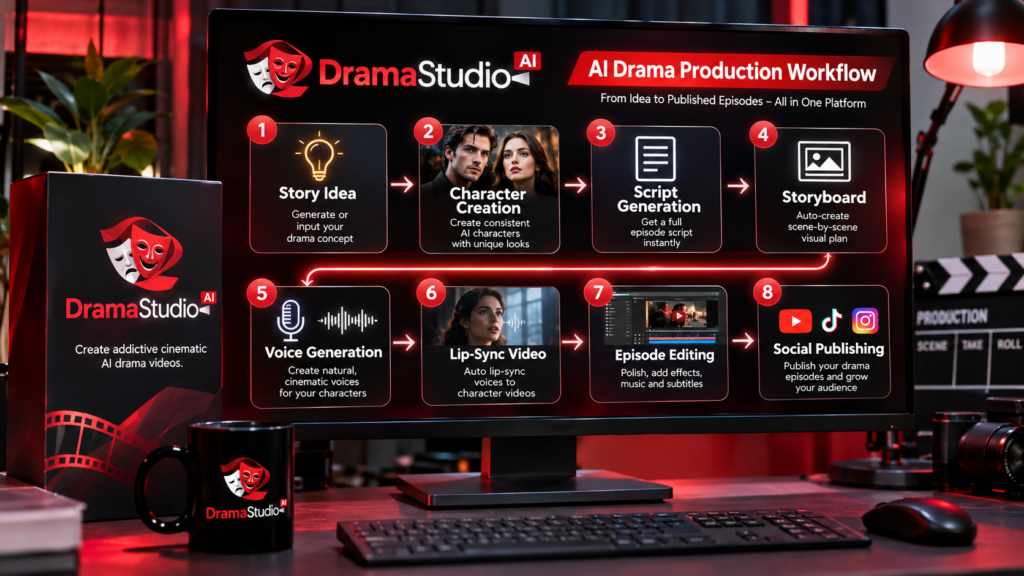
Using DramaStudioAI is a straightforward 10-step process that takes you from a simple story idea to a completed, ready-to-publish AI drama video. You simply enter an idea, develop the storyline, create consistent characters, generate scripts and scenes, review the visuals, add voices and music, produce your episodes, and prepare social media content. The platform guides you through each stage, allowing you to approve and edit your work before moving forward. Get access to DramaStudioAI here and follow this practical walkthrough to understand how to create your first AI drama series.
Getting Started with DramaStudioAI
After purchasing and activating your account, log in to the DramaStudioAI dashboard. This is your central workspace for creating dramas, managing characters, continuing unfinished projects, editing episodes, and preparing videos for publishing.
You do not need professional filmmaking experience, advanced editing skills, or an existing script. DramaStudioAI is designed to guide beginners through the production process, with AI handling much of the creative work.
Step 1: Start with a Story Idea
The first step is deciding what kind of drama you want to create. You have three ways to begin:
- Enter Your Own Idea: Type a short description of your story, up to 1,000 characters. For example, a billionaire discovers that the woman he rejected is secretly the owner of his company.
- Surprise Me: Let the AI generate an original drama concept when you do not have a specific storyline in mind.
- Choose a Ready-Made Template: Select from 105 pre-built story templates covering 22 different genres.
These genres include romance, revenge, betrayal, mystery, crime, horror, fantasy, family drama, workplace stories, and more. Beginners can start with a template and customize the storyline rather than building everything from scratch.
Step 2: Develop and Approve Your Story
Once you submit your idea, DramaStudioAI expands it into a structured drama concept. The AI can generate the title, logline, premise, target audience, emotional angle, central conflict, and overall season storyline.
You can also explore different opening hooks designed to capture attention quickly. The BingeHook Engine provides multiple hook styles, scores their estimated attention-grabbing potential, and helps you identify promising openings.
Review the suggested storyline carefully. If something does not fit your vision, edit the wording, change the direction, or improve the central conflict before approving the story.
Step 3: Create Your Drama Characters
Characters are essential to making an AI drama feel like a connected story rather than a collection of unrelated clips.
DramaStudioAI helps generate character profiles containing names, appearances, personalities, motivations, backgrounds, relationships, and secrets. You can use the suggested cast or create your own characters.
One particularly useful feature is Character DNA Lock. It helps maintain character identity and visual consistency across different scenes and episodes.
You can also build a reusable character library, making it easier to bring familiar characters into future productions without recreating their profiles each time.
Step 4: Generate the Episode Scripts
After approving your characters, move to the script creation stage. DramaStudioAI develops the storyline into individual episodes, complete with dialogue, scene descriptions, emotional directions, and dramatic developments.
Each episode is structured to maintain audience interest, typically beginning with an engaging hook and ending with a cliffhanger that encourages viewers to watch the next instalment.
Read through the dialogue and check whether the conversations sound natural. You can modify lines, improve emotional moments, and adjust the story before approving the scripts.
Step 5: Organize Your Scenes
Next, the AI divides the scripts into individual scenes. This is where your written story begins taking the shape of a visual production.
Review the location, characters involved, sequence of events, and actions taking place in each scene. Make sure the scenes follow the script logically and that important moments are not missing.
If a scene needs improvement, edit it before proceeding. A well-organized scene structure makes the subsequent visual generation process easier to manage.
Step 6: Generate the Visuals
Once your scenes are approved, DramaStudioAI moves into visual production. It creates the images and shots needed to bring the story to life.
Pay attention to character appearances, backgrounds, expressions, and the overall visual atmosphere. The objective is to make every scene feel like part of the same drama rather than a disconnected image sequence.
Review the generated visuals and make corrections wherever necessary. Remember that approving the earlier stages before moving forward helps reduce unwanted changes later.
Step 7: Add AI Voices, Dialogue and Lip-Sync
Visuals alone do not make an engaging drama. Characters need voices, dialogue delivery, and believable expressions.
DramaStudioAI provides AI-generated character voices with emotional delivery. Its TrueSync Voice Studio helps match spoken dialogue with character lip movements, creating a more immersive viewing experience.
Review the voice assignments and listen to the dialogue. Make sure the voices suit the characters and that emotional delivery matches the situation. You can also use the available music and sound tools to strengthen the atmosphere.
Step 8: Produce Your Finished Video
After completing the creative stages, move to video production. The platform brings the approved scenes, character visuals, voices, music, sound effects, and captions together into finished episodes.
Wait for the generation process to complete and review the output. Check scene transitions, dialogue synchronization, audio levels, and overall continuity. If something needs adjustment, return to the relevant editing stage rather than publishing an unfinished version.
Step 9: Edit, Preview and Export Your Episodes
DramaStudioAI includes an episode editor where you can preview the completed production directly in your browser.
You can rearrange scenes, enable or disable captions, adjust the music experience, and choose whether to display the To Be Continued end card. Once satisfied, export the completed episode as an MP4 video.
The advertised export format is vertical 720 × 1280 resolution at 30fps, suitable for platforms such as Instagram Reels, TikTok, and YouTube Shorts.
Step 10: Create Social Media Content and Publish
The final stage prepares your drama for distribution. DramaStudioAI can generate ready-to-use promotional content, including social media captions, hashtags, and descriptions for different platforms.
Download your finished videos and publish them consistently. You can build an audience around recurring characters, connected episodes, cliffhangers, and recognizable story themes.
You can also explore the platform’s branded streaming channel functionality. This allows you to showcase your dramas, offer introductory episodes for free, and potentially charge viewers to unlock additional episodes through the available payment arrangements.
Tips for Getting Better Results with DramaStudioAI
- Start with a compelling premise: A clear central conflict gives your drama a stronger foundation.
- Prioritize the opening hook: The first few seconds should give viewers a reason to continue watching.
- Maintain character consistency: Use Character DNA Lock and reusable character profiles.
- Review every approval stage: Correcting problems early can prevent unnecessary rework.
- Build connected episodes: Use cliffhangers and continuing storylines to encourage repeat viewing.
- Publish consistently: Develop a recognizable content format and study audience responses.
For a deeper understanding of the platform, its features, limitations, pricing, and monetization opportunities, you can also read our comprehensive DramaStudioAI review and detailed analysis.
Final Thoughts: From a Simple Idea to a Complete AI Drama
DramaStudioAI simplifies the process of creating short-form episodic entertainment by bringing storytelling, character development, scriptwriting, visual generation, voice production, editing, and publishing preparation into one guided workflow.
The biggest advantage is that you do not have to manage every production task independently. You can begin with a simple idea, let AI develop the creative elements, and retain control by reviewing and approving each stage.
For beginners, content creators, aspiring storytellers, and digital entrepreneurs, this provides an accessible way to experiment with AI-generated drama production without assembling a traditional filmmaking team.
If you want to understand the complete feature set and decide whether the platform fits your content creation goals, explore our complete DramaStudioAI review here.